

一点通AI
An AI-powered content creation tool that integrates ChatGPT for writing and Stable Diffusion for image editing, streamlining your creative process.
About 一点通AI
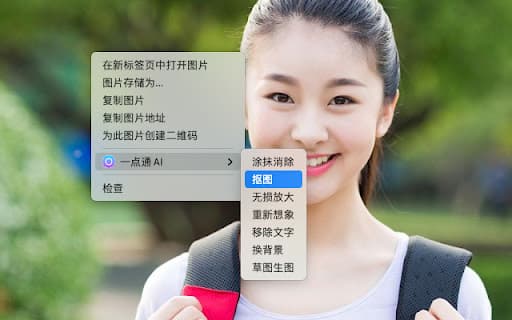
This versatile tool combines the capabilities of ChatGPT and Stable Diffusion (SD) to assist with both writing and image editing tasks. It provides over forty customizable templates tailored for platforms such as Xiaohongshu, short videos, WeChat Moments, and social groups. Users can easily modify text tone, translate, or summarize by right-clicking. Additionally, the tool leverages SD’s advanced image processing features, enabling users to remove blemishes, perform background removal with a single click, enlarge images without quality loss, reimagine visuals, delete text, generate images from descriptions, replace backgrounds, and convert sketches to images—all accessible through simple right-click options.
How to Use
Right-click on selected text to modify tone, translate, or summarize. Use right-click options on images to remove backgrounds, eliminate blemishes, enlarge images, or generate new visuals from descriptions.
Features
- Advanced image editing with Stable Diffusion technology
- AI-driven writing assistance using ChatGPT
- More than 40 customizable templates for diverse platforms
- Intuitive right-click menu for quick editing and content creation
Use Cases
- Creating images from text prompts
- Enhancing social media content efficiently
- Streamlining content writing and editing workflows
- Producing engaging marketing visuals for Xiaohongshu and WeChat
Best For
Pros
- Reduces time and effort in content production
- Offers a wide selection of customizable templates
- Integrates writing and image editing in one platform
- User-friendly right-click menu for quick actions
- Powerful image editing with Stable Diffusion
Cons
- AI feature effectiveness may vary with input quality
- Learning curve for new users unfamiliar with AI tools
- Performance depends on device processing power