
智译网页翻译-自动翻译、双语对照、AI对话
Advanced web translation plugin enhanced with AI-powered assistant for seamless multilingual browsing.
About 智译网页翻译-自动翻译、双语对照、AI对话
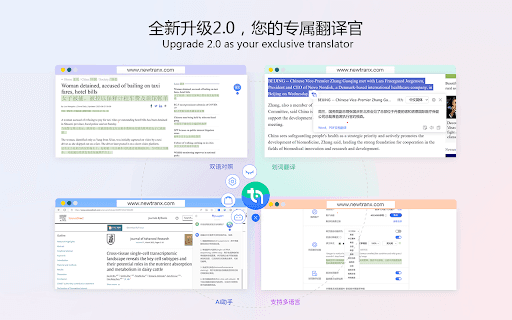
NewTranx Browser Translator Plugin is an intelligent web translation solution developed by NewTranx Technology. It detects the language of any webpage you visit and swiftly translates it into your preferred language. With features like bilingual display, automatic translation, and word-level translation, it simplifies browsing foreign websites. The plugin also integrates with the AI assistant LangGPT, enabling automatic page summaries and interactive chats for quick, efficient information access.
How to Use
The plugin automatically translates webpages based on your preferences. Enable or disable features such as automatic translation, bilingual display, and word translation through the settings menu. Access the AI assistant via the plugin's menu for summaries and interactive conversations.
Features
- Bilingual display for easy language comparison
- Automatic real-time webpage translation
- Supports a broad range of languages including European and Asian languages
- Word-level translation for selected text
- AI assistant provides page summaries and conversational support
Use Cases
- Reading international news articles
- Conducting multilingual research
- Learning new languages effectively
- Shopping on global e-commerce platforms
Best For
Pros
- Includes an AI assistant for quick information retrieval
- Supports bilingual display to aid language acquisition
- Automatically translates webpages for faster access
- Handles multiple languages with high accuracy
- Enhances understanding of foreign content efficiently
Cons
- Privacy concerns related to data processing
- Translations may occasionally be imperfect
- Overreliance on the plugin could impact language learning progress