

アンサー続けて君
A Chrome extension designed to automatically send the 'Continue' prompt to ChatGPT, enhancing longer response generation.
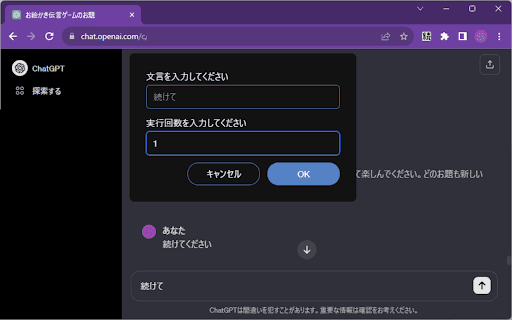
About アンサー続けて君
This Chrome extension streamlines the process of sending the 'Continue' prompt to ChatGPT multiple times. It simplifies interactions, enabling users to generate extended responses efficiently without manual repetition.
How to Use
Install the extension, click its icon during a ChatGPT session, specify the number of 'Continue' prompts to send, and it will automate the process for you.
Features
- Automatically sends 'Continue' prompts to ChatGPT
Use Cases
- Generating detailed, lengthy ChatGPT responses
- Saving time on repetitive prompt sending
- Enhancing productivity for content creators
Best For
Content creatorsWritersResearchersChatGPT power users
Pros
- Automates repetitive 'Continue' prompts
- Speeds up long response generation
- User-friendly and straightforward
Cons
- Requires ChatGPT chat window to be active
- Dependent on ChatGPT's response to 'Continue'
- Limited to sending only the 'Continue' prompt
FAQs
How do I set up and use the extension?
Install the extension, click its icon during a ChatGPT chat, enter the number of 'Continue' prompts needed, and it will handle the rest.
What is the main function of this extension?
It automates sending the 'Continue' prompt to ChatGPT multiple times to help generate longer responses.
Is this extension compatible with all ChatGPT versions?
It works with standard ChatGPT chat interfaces where prompts can be sent manually.
Can I customize the prompts sent by the extension?
No, it only automates the 'Continue' prompt; customization options are not available.
Does the extension work on mobile devices?
No, it requires a desktop browser where Chrome extensions can be installed and used.