

AI Bar - Prompt ChatGPT from the URL bar
AI Bar streamlines your workflow by redirecting URL bar prompts directly to ChatGPT, enhancing efficiency and saving time.
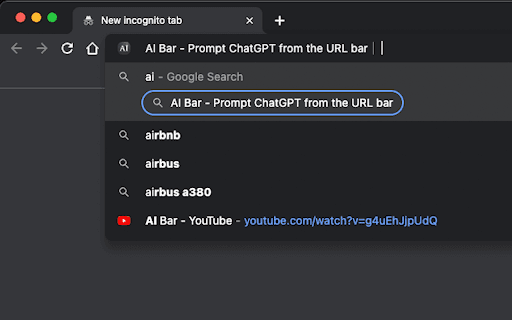
About AI Bar - Prompt ChatGPT from the URL bar
AI Bar allows you to input prompts directly into your browser's URL bar, instantly redirecting to ChatGPT with your query preloaded. This feature reduces navigation steps, enabling faster access to AI assistance.
How to Use
Type your prompt into the URL bar, press Enter, and AI Bar instantly redirects you to ChatGPT with your prompt ready for interaction.
Features
- Immediate redirection from URL bar to ChatGPT
Use Cases
- Access ChatGPT instantly from the browser
- Quickly generate ideas or content with minimal steps
- Streamline AI interactions during research or writing
- Enhance productivity for frequent ChatGPT users
Best For
StudentsResearchersWritersDevelopersFrequent ChatGPT usersContent creatorsOnline researchersProductivity enthusiasts
Pros
- Easy to install and use for seamless workflows
- Reduces the number of steps to access ChatGPT
- Speeds up task completion for busy users
Cons
- Relies on ChatGPT's availability and functionality
- Requires installation of the AI Bar browser extension
FAQs
What is the purpose of AI Bar?
AI Bar allows you to enter prompts directly into your browser's URL bar and quickly redirects you to ChatGPT, streamlining your AI interactions.
How does AI Bar improve productivity?
It minimizes navigation and input time by instantly redirecting your prompt to ChatGPT, saving multiple clicks each session.
Is AI Bar free to use?
Yes, AI Bar is a free extension that enhances your browsing and AI experience without additional costs.
What do I need to use AI Bar?
You need to install the AI Bar browser extension and have access to ChatGPT for seamless integration.
Which browsers support AI Bar?
AI Bar is compatible with popular browsers like Chrome and Firefox, ensuring broad accessibility.