

AI Prompt Saver
A Chrome extension designed to securely save, organize, and reuse AI prompts for enhanced productivity.
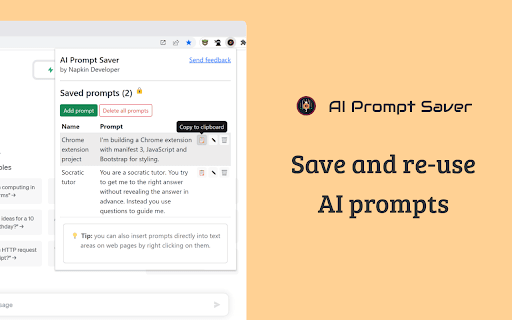
About AI Prompt Saver
AI Prompt Saver is a powerful Chrome extension that enables users to securely save, organize, and quickly reuse prompts for AI platforms like OpenAI and Bard. Users can easily add prompts by selecting text on web pages or clicking the extension toolbar icon. Prompts can be inserted seamlessly into text fields through right-click options, streamlining your workflow and saving time.
How to Use
Install the AI Prompt Saver Chrome extension. Save prompts by selecting text on web pages or clicking the toolbar icon. Insert prompts into text fields by right-clicking and choosing from saved options.
Features
- Easily save and organize AI prompts
- Insert prompts directly via right-click menu
- Secure local storage within your browser
- Add prompts through text selection or toolbar icon
Use Cases
- Efficiently insert recurring prompts into AI tools like OpenAI and Bard
Best For
AI prompt engineersResearchersContent writersMarketing professionalsContent creators
Pros
- Secure local storage within the browser
- Intuitive and user-friendly interface
- Quick prompt insertion via right-click
- Simplifies prompt management and reuse
Cons
- No cloud backup or synchronization
- Limited to Google Chrome browser
- Functionality may vary with browser updates
FAQs
Where are my prompts stored?
All prompts are securely stored locally in your browser.
How do I add a new prompt?
Add prompts by selecting text on a webpage or clicking the extension icon.
How can I insert a saved prompt?
Right-click in a text input area and choose your saved prompt to insert it.
Does this extension support cloud backup?
No, prompts are stored locally and do not sync with cloud services.
Is this extension compatible with other browsers?
Currently, it is only available for Google Chrome.