

AI URL to Video
AI-driven Chrome extension that converts URLs into engaging videos effortlessly.
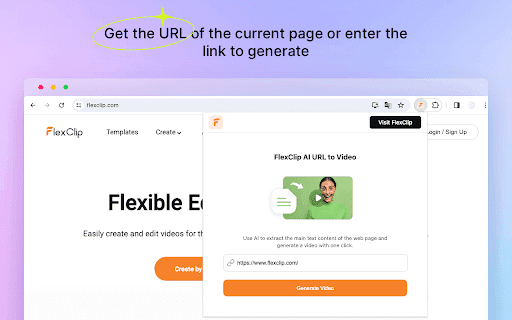
About AI URL to Video
FlexClip AI URL to Video is a powerful Chrome extension that harnesses artificial intelligence to extract key text from web pages and instantly generate videos. It simplifies transforming blog posts, news articles, and online content into captivating videos with just one click, saving time and enhancing content marketing efforts.
How to Use
Install the FlexClip AI URL to Video extension. Navigate to the webpage you want to convert, click the extension icon, and let it extract the content. Log into your FlexClip account, customize the generated scenes, and export the final video. Share directly on social media platforms to maximize reach.
Features
- Real-time editing and customization
- AI-powered text extraction from web pages
- Automatic matching of media resources
- Built-in AI voice synthesis
- One-click video generation from URLs
Use Cases
- Convert blog articles into engaging social media videos
- Create educational video summaries from online news
- Turn web content into shareable marketing videos
Best For
Content creatorsDigital marketersBloggersEducatorsSocial media managers
Pros
- Offers intuitive editing tools for personalized videos
- User-friendly, no prior editing skills needed
- Automates video creation from URLs to save time
- Includes AI for content extraction and media matching
- Supports multiple languages for voiceovers
Cons
- Dependent on the FlexClip online platform
- Quality of output relies on source content clarity
- Some videos may require manual fine-tuning
FAQs
What is the main function of the FlexClip AI URL to Video extension?
It uses AI to extract web page text and instantly generate a video with a single click.
How can I use the FlexClip AI URL to Video extension effectively?
Install the extension, visit your target webpage, click the extension icon, and follow prompts to generate and customize your video in FlexClip.
What are the key features of this Chrome extension?
Features include AI-powered text extraction, automatic media matching, AI voice synthesis, and easy editing for quick video creation.
Is the extension suitable for beginners?
Yes, it’s designed to be user-friendly, requiring no prior video editing experience.
Can I customize the generated videos?
Absolutely, you can edit scenes, add media, and personalize content before exporting.