

aiPromptPal
A powerful browser extension designed to optimize your ChatGPT experience and significantly boost productivity.
About aiPromptPal
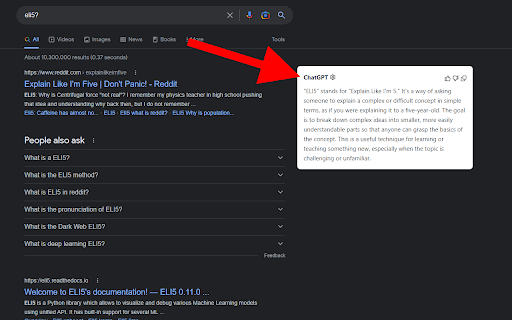
The Scailability ChatGPT browser extension enhances your interaction with ChatGPT, enabling quick access and improved productivity. It allows you to right-click selected text to send personalized prompts, displays ChatGPT responses alongside search engine results, simplifies email composition within Gmail, and provides fast access to ChatGPT directly from the Chrome address bar.
How to Use
Install the extension, right-click on selected text to send custom prompts to ChatGPT, view ChatGPT responses next to search results, compose emails in Gmail using ChatGPT, or type 'ai' followed by tab in Chrome’s address bar to access ChatGPT instantly.
Features
- Enable email drafting with ChatGPT in Gmail
- Display ChatGPT responses alongside search engine results
- Quickly access ChatGPT via the Chrome address bar
- Right-click selected text to send custom prompts
Use Cases
- Send highlighted text with custom prompts for analysis or rewriting.
- Get instant summaries and answers from ChatGPT while browsing.
- Generate email drafts quickly within Gmail using ChatGPT.
Best For
Digital marketersFrequent ChatGPT usersContent writersCustomer support teamsAcademic researchersStudents
Pros
- Boosts productivity by simplifying ChatGPT workflows
- Improves accessibility and ease of use
- Supports custom prompts for selected text
- Seamlessly integrates ChatGPT into browsing and email tasks
Cons
- Requires a ChatGPT account to operate
- May face compatibility issues with some websites or browsers
- Functionality depends on ChatGPT's availability
FAQs
What is the purpose of the Scailability ChatGPT browser extension?
It enhances ChatGPT usage by enabling right-click prompts, displaying responses alongside search results, assisting with Gmail email drafts, and providing quick access from Chrome's address bar.
How can I use the right-click prompts?
Select text on a webpage, right-click, and choose a custom prompt to send the text directly to ChatGPT for analysis or rewriting.
How do I access ChatGPT from the Chrome address bar?
Type 'ai' and press tab in Chrome’s address bar to instantly send a prompt to ChatGPT.
Do I need a ChatGPT account to use this extension?
Yes, a valid ChatGPT account is required to access and utilize the extension’s features.
Is the extension compatible with all websites?
Compatibility may vary depending on website structure and browser configuration. Some sites might have limited support.