

Allclues Extension
AI-empowered Chrome extension for efficient online information capture, organization, and learning.
About Allclues Extension
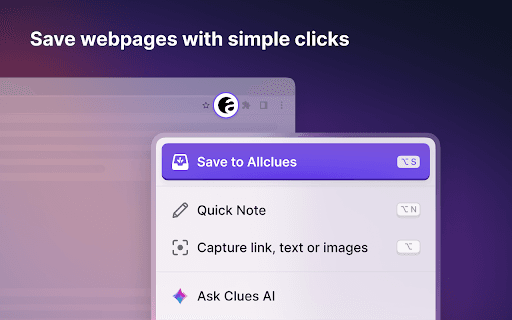
Allclues is a Chrome extension tailored for thinkers and learners, utilizing AI to simplify the collection, categorization, and retrieval of online information. Users can save links, text, images, and notes, with features like AI-powered search, intelligent content matching, quick note-taking, and customized content captures enhancing productivity.
How to Use
Install the Allclues Chrome extension. Save web content effortlessly with one click. Use Clues AI for summaries and quick answers. Take notes directly on web pages. The extension intelligently suggests relevant pages from your Allclues account based on your activity.
Features
- Capture notes and content directly on web pages
- Save links, images, and text snippets quickly
- Utilize Clues AI for summaries and instant answers
- One-click saving of web content
- Smart content matching and personalized suggestions
Use Cases
- Capturing images and text snippets for later reference
- Researching topics by saving related articles and notes
- Taking and saving notes while browsing
- Generating summaries of lengthy web pages with Clues AI
Best For
WritersKnowledge workersStudentsResearchersContent creatorsLifelong learners
Pros
- Effortless content saving with a single click
- Custom content capture including links, images, and notes
- AI-powered search, summaries, and insights
- Intelligent suggestions based on saved content
- Quick and seamless note-taking experience
Cons
- AI features may need prompt adjustments for optimal results
- Requires an existing Allclues account
- Available only on the Chrome browser
FAQs
Do I need an Allclues account to use this Chrome extension?
Yes, an active Allclues account is required to access all features.
What types of content can I save with Allclues?
You can save links, text, images, and notes directly to your account.
How does Clues AI assist me?
Clues AI helps generate summaries and answers by analyzing web pages or selected text.
Is the extension compatible with all browsers?
No, it is specifically designed for the Chrome browser.
Can I organize my saved content easily?
Yes, the extension offers smart categorization and suggestion features for efficient organization.