

Ato
An AI-driven tab organizer that boosts browsing efficiency and enhances productivity through intelligent tab management.
About Ato
The AI-powered Tab Organizer (ATO) intelligently manages and sorts your browser tabs. It streamlines your browsing experience, allowing you to quickly locate and access tabs, thereby significantly boosting your productivity and workspace organization.
How to Use
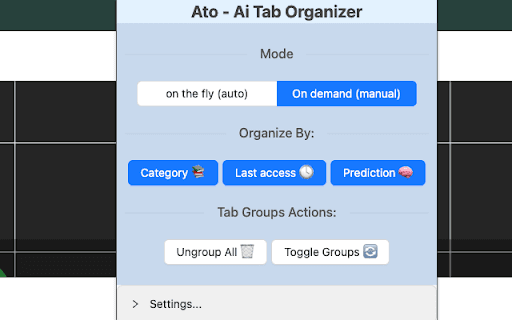
Use ATO either by clicking a button to organize all open tabs instantly or let it automatically organize new tabs as they are created for seamless browsing.
Features
- Sorts tabs based on last accessed time
- Predicts and organizes tabs according to usage frequency
- Automatically categorizes tabs for better organization
Use Cases
- Easily revisit recently used tabs
- Prioritize frequently accessed tabs for faster browsing
- Automatically organize new tabs upon creation
- Declutter your workspace by sorting open tabs
- Group related tabs by topic or theme
Best For
ProfessionalsResearchersHeavy tab usersStudentsTeam collaborators
Pros
- Simplifies tab organization
- Offers automatic and manual organization options
- Enhances browsing efficiency
- Supports multiple sorting methods
- Boosts overall productivity
Cons
- Learning curve for understanding various organization modes
- Accuracy relies on AI categorization quality
- Initial setup may be required
FAQs
How does ATO categorize browser tabs?
ATO analyzes each tab's content and properties to determine its context, enabling accurate categorization based on semantics.
What organization methods does ATO offer?
ATO provides organization by category, last access time, and usage frequency prediction.
Is automatic tab organization possible with ATO?
Yes, ATO can automatically organize your tabs in real-time as new ones are opened.
Can I customize how ATO organizes my tabs?
Yes, you can choose preferred organization modes and settings within the extension.
Does ATO work with all major browsers?
ATO is compatible with popular browsers like Chrome and Firefox, ensuring broad usability.