

Autopilot Extension
Create professional emails effortlessly from bullet points, boosting your email writing efficiency and productivity.
About Autopilot Extension
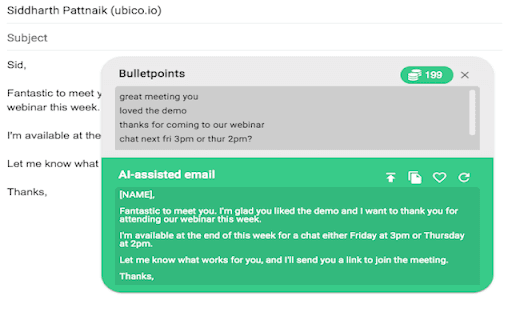
This tool transforms simple bullet points into polished, professional emails, helping you write faster and more efficiently. It alleviates the stress and time-consuming nature of email composition, enhancing your overall productivity.
How to Use
Enter key points or bullet points outlining your message. The tool then automatically creates a complete, professional email based on your input, ready to send.
Features
- Speeds up email creation, saving time
- Converts bullet points into professional emails
- Enhances overall email productivity
Use Cases
- Draft professional emails quickly for inquiries, updates, or follow-ups
Best For
Business professionalsFrequent email writersProject managersCustomer service teamsSales professionals
Pros
- Significantly reduces email writing time
- User-friendly with simple bullet point input
- Minimizes email-related stress
- Produces clear, professional email drafts
Cons
- May require minor editing for personalized touches
- Lacks the personal nuance of manual writing
- Output quality depends on input clarity
FAQs
How does the email generator work?
It uses advanced algorithms to convert your bullet points into complete, professional emails quickly.
Can I customize the generated emails?
Yes, you can easily edit the emails to tailor them to your specific needs.
What types of emails can I create?
You can generate various professional emails, including inquiries, follow-ups, and status updates.
Is the tool suitable for all industries?
Yes, it adapts to different professional contexts, making it versatile for multiple industries.
Does this tool improve email response times?
Absolutely, by streamlining the drafting process, it helps you respond faster and more efficiently.