
AutoVerify
A Chrome extension that leverages advanced OCR technology to automatically detect and complete CAPTCHAs, enhancing browsing efficiency.
About AutoVerify
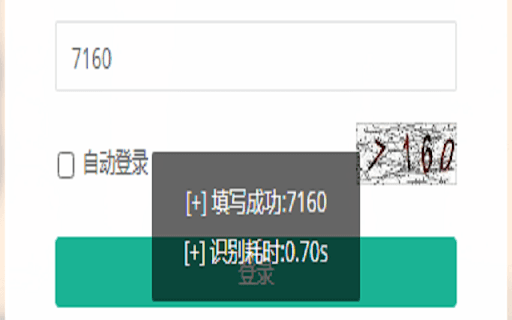
AutoVerify is a powerful Chrome extension that streamlines your online interactions by automatically detecting and filling CAPTCHAs. Utilizing cutting-edge OCR technology, it ensures quick and accurate recognition, saving time and reducing manual effort. Ideal for professionals and frequent internet users, AutoVerify enhances your browsing productivity and simplifies form submissions.
How to Use
Activate AutoVerify with a single click in your Chrome browser to automatically recognize and fill CAPTCHAs on supported websites.
Features
- Simple, one-click activation for ease of use
- Compatible with a wide range of websites and forms
- Ensures data security through encryption
- High accuracy in CAPTCHA recognition and quick processing
Use Cases
- Speeding up online browsing by bypassing manual CAPTCHA inputs
- Automating CAPTCHA completion to accelerate form submissions
- Enhancing productivity for web developers testing forms
- Reducing repetitive tasks for data entry professionals
Best For
Data entry professionalsWeb developersBusiness usersFrequent online form fillersDigital marketers
Pros
- Secure encryption safeguards your data
- User-friendly with simple activation
- Speeds up browsing and form completion
- Reduces manual CAPTCHA entry time
Cons
- OCR accuracy may vary with complex CAPTCHAs
- Not compatible with all CAPTCHA types
- Performance depends on image clarity
FAQs
What is AutoVerify?
AutoVerify is a Chrome extension that automatically detects and fills CAPTCHAs, streamlining your online tasks.
How does AutoVerify recognize CAPTCHAs?
It uses advanced OCR technology to accurately identify and process CAPTCHA images in real time.
Is AutoVerify safe to use?
Yes, it encrypts all data and prioritizes your privacy, ensuring secure operation.
Does AutoVerify work on all websites?
It works on most sites that use standard CAPTCHA formats, but some complex CAPTCHAs may not be fully compatible.
How do I activate AutoVerify?
Simply click the extension icon in Chrome to enable automatic CAPTCHA recognition and filling.