

Barra/AI
A lightweight AI browser extension that seamlessly integrates OpenAI models into any text input field for enhanced productivity.
About Barra/AI
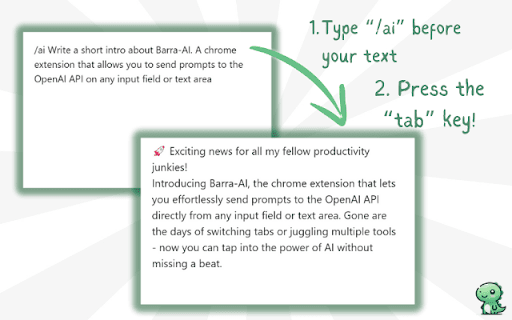
Barra/AI is an intuitive, minimalistic browser extension that enables users to leverage OpenAI's language models directly within any text input. By typing '/ai' followed by a prompt and pressing Tab, users receive AI-generated responses instantly. Designed for simplicity and privacy, it processes data locally on your device and requires you to provide your own OpenAI API key.
How to Use
1. Install the Barra/AI extension. 2. Access settings to input your OpenAI API key and select your preferred GPT model. 3. In any text box, type '/ai' followed by your prompt. 4. Press the Tab key to generate the AI response instantly.
Features
- No subscription fees or hidden charges
- Enables AI-generated text in any text field
- Integrates with OpenAI models for versatile use
- Processes data locally for enhanced privacy
Use Cases
- Crafting emails, social media posts, or documents directly in your browser
Best For
ResearchersDevelopersWritersStudentsContent creators
Pros
- No subscription costs or hidden fees
- Ensures data privacy with client-side processing
- User-friendly and easy to operate
- Open-source and customizable to fit your needs
Cons
- Incompatible with sites using Lexical editor frameworks (e.g., Facebook, Instagram, Threads)
- Requires an OpenAI API key for operation
- Dependent on your OpenAI API usage limits
FAQs
Is Barra/AI free to use?
Yes, Barra/AI is free. However, you must provide your own OpenAI API key to access the AI models.
Where is my data stored when using Barra/AI?
All data stays in your browser's local storage. API requests are sent directly from your device, maintaining your privacy.
Why doesn't Barra/AI work on Facebook, Instagram, or Threads?
Barra/AI currently doesn't support sites using the Lexical editor framework, such as Facebook, Instagram, and Threads. The developers are working on a compatible solution.