

Betafi: Record, Add Notes, Transcribe Calls
Betafi transforms Google Meet™ by providing free recording, transcription, and AI-generated summaries to enhance your meetings.
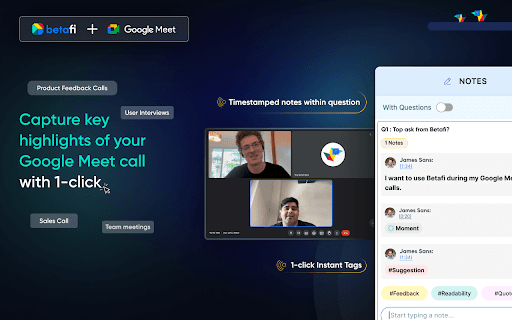
About Betafi: Record, Add Notes, Transcribe Calls
Betafi is a powerful Chrome extension that enhances Google Meet™ by enabling automatic recording, real-time highlights, teammate tagging for feedback, and providing access to transcripts and GPT-4-powered summaries—all for free. Its features streamline meeting organization, improve collaboration, and boost productivity during and after virtual meetings.
How to Use
Download and install the Betafi Chrome extension. During your Google Meet™ calls, activate Betafi to record, highlight key moments, tag colleagues, and take notes. After the meeting, access recordings, transcripts, and AI summaries effortlessly.
Features
- Supports transcription in over 30 languages and dialects
- Share meeting recordings via public links
- Timestamp important moments with highlights
- Create and edit action points from conversations
- Generate AI-based GPT-4 meeting summaries
- Translate transcripts into over 150 languages
- Create short video clips from recordings
- Timestamped note-taking for better organization
- Automatically record and download Google Meet™ sessions
- Tag stakeholders for focused feedback
Use Cases
- Sales team meetings
- Customer feedback sessions
- Remote team internal meetings
- Product development and user research
- Market analysis and surveys
- Product demonstrations and demos
- Hiring interviews and recruitment
- Educational online classes
- User interviews and focus groups
- Webinars and virtual events
Best For
Remote teamsSales professionalsMarketing teamsProduct managersRecruitersUser researchersEducators
Pros
- Free access to recordings, transcriptions, and AI summaries
- Effortless sharing of meeting highlights and recordings
- Enhances team collaboration and feedback processes
- Supports multiple languages for transcription and translation
- Integrates seamlessly with platforms like Slack, Notion, and Miro
Cons
- Requires the Betafi Chrome extension for full functionality
- Free plan offers up to 5 hours of transcription per month
- Only works during Google Meet™ calls
FAQs
Is Betafi free to use?
Yes, Betafi is free for Google Meet™ users and includes up to 5 hours of transcription and collaboration features.
Which languages does Betafi support for transcription?
Betafi offers transcription in over 30 languages and dialects, including French, Russian, Chinese, and Hinglish.
Can Betafi translate transcripts into other languages?
Yes, Betafi can translate transcripts into over 150 languages, such as Dutch, Danish, and Bahasa.
How do I install Betafi for Google Meet?
Download the Betafi Chrome extension from the Chrome Web Store and enable it during your Google Meet™ sessions.
What are the main benefits of using Betafi?
Betafi improves meeting organization, facilitates collaboration, saves time with AI summaries, and supports multiple languages for global teams.