

BudGPT
Chrome extension that uses AI to read aloud and summarize web content for enhanced accessibility and productivity.
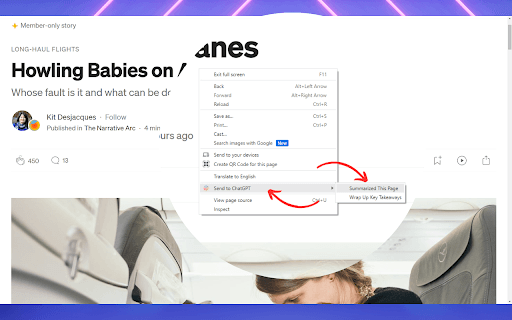
About BudGPT
BudGPT is a powerful Chrome extension leveraging artificial intelligence to read news articles and web pages aloud using high-quality voices. It enables users to summarize, explain complex terms, and extract key points directly from web content without switching to another interface. Additionally, BudGPT offers translation features and assists with composing email responses, making it ideal for boosting learning, productivity, and accessibility through audio-based web interaction.
How to Use
Install the BudGPT Chrome extension, log into ChatGPT within your browser, save your valid BudGPT token in the extension settings, and navigate to any webpage. Click the speaker icon for summaries or right-click selected text to generate custom prompts.
Features
- Summarizes articles and news quickly
- Provides explanations of specific words on web pages
- Translates web pages into multiple languages
- Supports customizable prompts for context menus and voice buttons
- Offers premium voice options for narration
- Enables AI-driven text-to-speech for web content
- Extracts key points from articles and web pages
Use Cases
- Understanding web content without extensive reading
- Explaining complex topics or vocabulary on websites
- Assisting in composing email replies with AI support
- Quickly summarizing articles for fast information access
- Listening to news and articles during commutes or travel
Best For
Pros
- Facilitates learning by summarizing and explaining content
- Offers customizable prompts for personalized AI assistance
- Improves accessibility with audio-based web interaction
- Boosts productivity by enabling multitasking
- Works seamlessly on any website with text content
Cons
- Requires a valid BudGPT token (free trial available)
- May need configuration to set custom prompts
- Requires a ChatGPT login session for operation
- Dependent on ChatGPT’s response accuracy and quality