

BuildMap
A Chrome extension designed for project managers to enhance efficiency with structured frameworks and valuable resources.
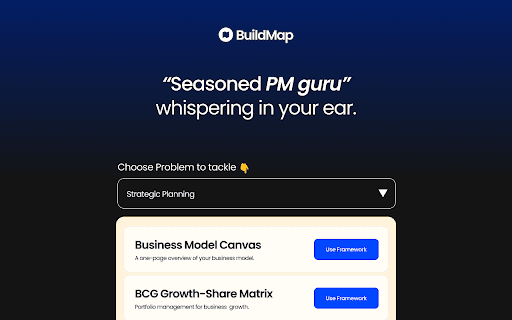
About BuildMap
BuildMap is a powerful Google Chrome extension crafted to help project managers execute projects with precision. It offers a suite of frameworks and resources to streamline workflows, minimize revisions, and boost confidence during meetings. With a straightforward 5-step process, users can access problem statements, relevant frameworks, and templates, making project management more efficient and impactful.
How to Use
1. Download and install the extension from the Chrome Web Store. 2. Launch the extension and select a problem statement from the dropdown. 3. Pick an appropriate framework. 4. Click 'Use Template' to copy the framework. 5. Paste it into your workspace to start working.
Features
- One-click template copying for efficiency
- Extensive library of project management frameworks
- Curated resources with relevant links
- Access to ready-made problem statements
Use Cases
- Enhancing confidence in meetings
- Simplifying product requirement documentation
- Accelerating project timelines
- Reducing unnecessary project revisions
Best For
Pros
- Helps eliminate aimless efforts and boosts project accuracy
- Provides structured frameworks for effective project planning
- Quick access to relevant resources and templates
- Intuitive 5-step process for ease of use
Cons
- Limited insight into the depth of available frameworks
- Dependent on pre-curated content may restrict flexibility
- Effectiveness varies based on the quality of included resources