

Bulk ChatGPT Prompter
A powerful browser extension that enables efficient bulk prompting in ChatGPT while offering seamless data management features.
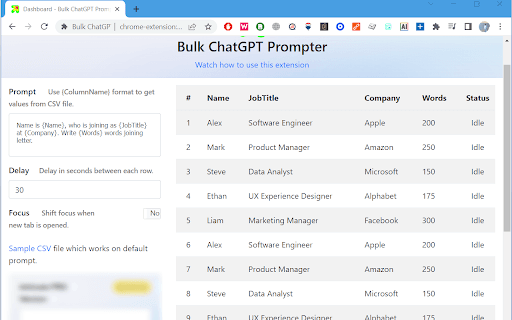
About Bulk ChatGPT Prompter
The Bulk ChatGPT Prompter is a versatile browser extension that simplifies managing multiple prompts. Users can upload prompts via CSV files, set custom delays, and ensure continuous workflow without losing tab focus. Version 2 adds data saving by sending web requests to user-specified endpoints, enhancing automation and data handling capabilities.
How to Use
Install the extension, upload your prompts using a CSV file, set delay options, and start processing. For Version 2, configure endpoints to automatically save ChatGPT responses.
Features
- Upload multiple prompts with CSV files
- Adjustable delay settings between prompts
- Send data to custom endpoints (Version 2)
- Keeps tab focus active during prompt execution
Use Cases
- Creating bulk content for various topics
- Saving and analyzing ChatGPT responses
- Automating testing of multiple prompts
- Conducting A/B testing with different inputs
Best For
Digital marketersContent creatorsSoftware developersResearch professionalsData analysts
Pros
- Supports data saving to custom endpoints (Version 2)
- Customizable delays for optimized performance
- Optimized for seamless ChatGPT interface integration
- Maintains focus on the active tab during use
- Efficiently handles large volumes of prompts
Cons
- Requires CSV file preparation before use
- Setting up endpoints for data saving may need technical knowledge
- Dependent on ChatGPT's web interface stability
FAQs
What file format is needed to upload prompts?
Prompts should be uploaded in CSV (Comma Separated Values) format for compatibility.
Can I set the speed at which prompts are sent?
Yes, you can customize the delay duration between each prompt for optimal pacing.
Is the extension compatible with all websites?
The extension is optimized specifically for the ChatGPT interface for best performance.
How does data saving work in Version 2?
Version 2 enables saving ChatGPT responses by sending web requests to your configured endpoints within the extension settings.
Does this extension support bulk prompt management?
Yes, it allows uploading and managing multiple prompts efficiently via CSV files.