

BunBox
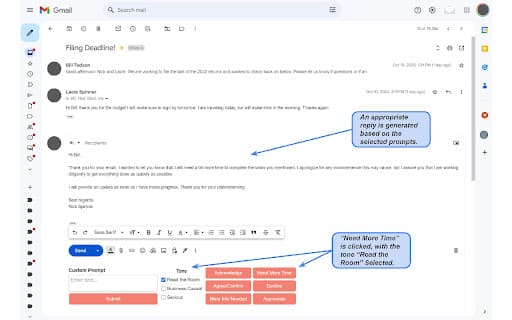
BunBox leverages AI technology to efficiently summarize emails and generate suggested responses within Gmail™.
About BunBox
BunBox enhances Gmail™ productivity by using AI to quickly summarize email content and suggest appropriate responses, helping users manage their inbox more efficiently.
How to Use
Integrate BunBox with Gmail™ to automatically generate email summaries and suggested responses. Review the summaries and responses before sending to ensure accuracy and relevance.
Features
- Automated email response suggestions
- AI-powered email summarization for quick insights
Use Cases
- Quickly grasp email content without reading full messages
- Respond faster with AI-generated email suggestions
- Manage high email volume efficiently
- Streamline inbox organization and communication
Best For
Business professionalsExecutivesHigh-volume email usersTeam managersCustomer support teams
Pros
- Enhances inbox management efficiency
- Saves time through automatic email summaries
- Facilitates faster email responses
- Integrates seamlessly with Gmail™
Cons
- Response suggestions may sometimes be off-topic
- Email summaries' accuracy can vary
- Dependent on Gmail™ integration
FAQs
How does BunBox generate email summaries?
BunBox uses AI to analyze email content and extract key points, providing concise summaries for quick understanding.
Can BunBox be used with email providers other than Gmail™?
Currently, BunBox is exclusively designed for Gmail™ users and does not support other email platforms.
Is BunBox suitable for professional or personal email use?
BunBox is ideal for both professional and personal email management, especially for users with high email volumes.
Does BunBox improve response time to emails?
Yes, by providing suggested responses, BunBox helps users reply more quickly and efficiently.
Is there a cost associated with BunBox?
Pricing details are unavailable; please check the official BunBox website for current plans and options.