

Cata - Question Navigator
A Chrome extension that enhances your ChatGPT experience by providing an intuitive side directory for seamless navigation.
About Cata - Question Navigator
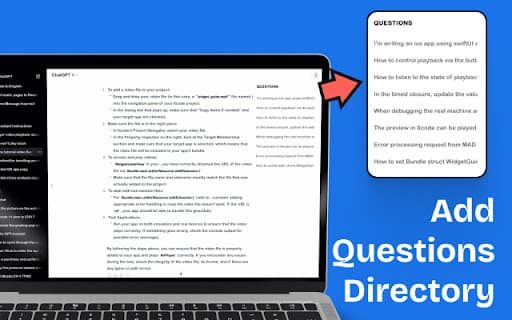
Cata - AI Chat Directory is a powerful Chrome extension designed to improve your ChatGPT interactions. It offers a convenient side panel that displays your question history, enabling quick access and effortless navigation through your conversation history within ChatGPT sessions.
How to Use
Download and install the Cata - AI Chat Directory from the Chrome Web Store. Once added, a side panel appears in ChatGPT, allowing you to view your question history and jump to specific messages with a simple click.
Features
- Integrated side panel displaying your question history
- One-click navigation to specific messages within ChatGPT
Use Cases
- Efficiently locate and review past questions and responses in ChatGPT sessions
Best For
ChatGPT users seeking better session managementProfessionals improving workflowResearchers analyzing conversation dataStudents organizing study sessionsContent creators managing ideas
Pros
- Streamlines access to conversation history
- Enhances navigation within ChatGPT sessions
- Easy to install and user-friendly interface
Cons
- Limited to ChatGPT platform only
- Provides navigation features without additional tools
FAQs
What is the purpose of the Cata - AI Chat Directory?
It adds a sidebar to ChatGPT for viewing your question history and navigating to specific messages easily.
How do I install and use Cata - AI Chat Directory?
Download the extension from the Chrome Web Store, and it will automatically display a side panel in ChatGPT for quick navigation.
Is Cata compatible with all browsers?
No, it is designed specifically for Google Chrome. Compatibility with other browsers may vary.
Can I access my chat history offline?
No, the extension requires an internet connection to sync and display your chat history within ChatGPT.
Does Cata work with all ChatGPT versions?
It works with the standard ChatGPT interface supported by Chrome, but may not be compatible with third-party or customized versions.