

Celerity-AI Text Enhancer
Enhance your writing effortlessly with the Celerity-AI Text enhancer Chrome extension, powered by advanced AI features.
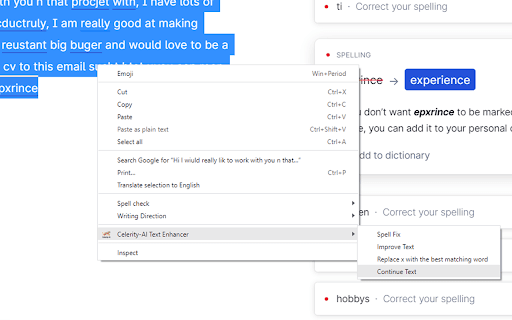
About Celerity-AI Text Enhancer
Celerity-AI Text enhancer is a user-friendly Chrome extension designed to accelerate your writing process. Easily select text, right-click, and choose from features like text improvement, spelling correction, text continuation, and synonym replacement. All results are automatically copied to your clipboard for quick use.
How to Use
Install the extension, select your text, right-click, and choose the desired editing option. The improved text is instantly copied to your clipboard for easy pasting.
Features
- Generate text continuations
- Enhance and improve writing quality
- Find accurate synonyms for words
- Automatically correct spelling errors
Use Cases
- Enhance the clarity and quality of your writing quickly
- Discover synonyms to diversify your vocabulary
- Fix spelling mistakes effortlessly
- Create seamless text continuations
Best For
Pros
- Results are automatically copied to the clipboard for quick use
- Supports multitasking while processing text
- Speeds up editing and writing workflows
- Offers multiple powerful text enhancement features
- Includes keyboard shortcuts for faster operations
Cons
- Currently not compatible with Google Docs
- Requires a paid subscription for full access
Pricing Plans
Choose the perfect plan. All plans include 24/7 support.
Monthly Subscription
Unlock all features of the Celerity-AI Text enhancer Chrome extension with a flexible subscription plan.
Get Started