

ChagtGPT Exporter
A versatile plugin that enables exporting ChatGPT conversations in various formats for easy sharing and archiving.
About ChagtGPT Exporter
ExportGPT is a powerful ChatGPT conversation export plugin that allows users to download their chats in multiple formats. Supports exporting to Text, PNG, Markdown, and PDF for seamless sharing and record-keeping.
How to Use
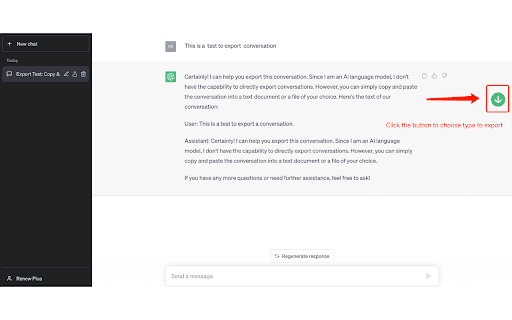
Visit https://chat.openai.com and ensure the ExportGPT plugin is active. A button will appear on the right side of the chat interface. Click it to select your preferred export format and save your conversation.
Features
- Supports exporting ChatGPT chats to Text, PNG, Markdown, and PDF formats.
Use Cases
- Including ChatGPT conversations in reports or presentations.
- Archiving chats for future reference and record-keeping.
- Sharing readable ChatGPT conversations with colleagues or clients.
Best For
StudentsWritersResearchersFrequent ChatGPT usersCustomer support teams
Pros
- Simple interface with a direct export button on ChatGPT.
- Enables easy sharing and secure archiving of conversations.
- Provides offline access to chat histories.
- Supports multiple export formats for versatility.
Cons
- Requires plugin installation and activation.
- Limited to exporting existing conversations.
FAQs
What file formats does ExportGPT support?
ExportGPT allows exporting ChatGPT conversations as Text, PNG, Markdown, and PDF files.
How can I export my ChatGPT chats?
Open ChatGPT at https://chat.openai.com, activate ExportGPT, and click the export button to choose your format.
Is ExportGPT free to use?
Yes, ExportGPT is available at no cost for exporting your conversations.
Can I export multiple conversations at once?
ExportGPT supports exporting individual chats; batch exporting is not currently available.
Does ExportGPT work on mobile devices?
Yes, the plugin functions on mobile browsers that support extensions and plugins.