

Chat GPT Bookmarks
Effortlessly bookmark and organize Chat GPT conversations for quick access.
About Chat GPT Bookmarks
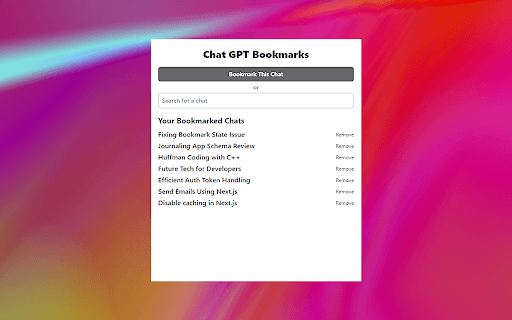
This browser extension simplifies the process of bookmarking and managing your Chat GPT conversations. Save important chats with a single click, easily search through your saved discussions, and delete outdated conversations. Designed for users who want to efficiently track key insights and maintain organized chat histories.
How to Use
Install the extension, then click the bookmark icon during a Chat GPT session to save the conversation. Use the extension interface to search, organize, and delete saved chats effortlessly.
Features
- Quickly delete unnecessary conversations
- One-click bookmarking during Chat GPT sessions
- Advanced search options for saved chats
Use Cases
- Saving important Chat GPT responses for future reference
- Organizing multiple chat sessions efficiently
- Retrieving specific information from past chats
- Managing chat history for research or work projects
- Keeping track of key insights from Chat GPT
Best For
StudentsContent creatorsProfessionals using Chat GPT for workWritersResearchers
Pros
- Speeds up access to vital information
- User-friendly and intuitive interface
- Enhances organization of Chat GPT conversations
Cons
- Limited features beyond bookmarking and managing chats
- Relies on Chat GPT’s platform functionality
- May require periodic cleaning of outdated conversations
FAQs
What is the main function of this extension?
It allows you to bookmark and manage your Chat GPT conversations efficiently.
How can I save a chat session in Chat GPT?
Click the bookmark icon during your chat to instantly save the conversation.
Is it possible to search through my saved chats?
Yes, the extension offers a search feature to find specific conversations quickly.
How do I delete a saved conversation?
Use the extension interface to select and delete conversations you no longer need.
Is this extension suitable for research purposes?
Absolutely, it helps organize and retrieve chat transcripts for research or work projects.