

Chat GPT for Google
A browser extension that displays ChatGPT responses alongside search engine results for enhanced browsing and quick AI assistance.
About Chat GPT for Google
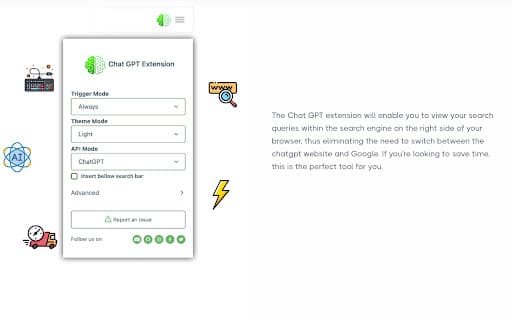
The ChatGPT Browser Extension seamlessly displays AI-generated responses next to your search engine results across platforms like Google, Bing, and Yahoo. Utilizing the official OpenAI GPT-3 API, it offers features such as code syntax highlighting, customizable trigger modes, dark and light themes, and easy text copying to streamline your browsing experience.
How to Use
Install the extension, log in with your OpenAI account, and navigate your preferred search engines. ChatGPT responses will automatically appear next to your search results for instant access.
Features
- Supports multiple popular search engines
- Displays AI-generated ChatGPT responses next to search results
- Customizable trigger modes for activation
- Easy copying of responses to clipboard
- Dark and light display themes
- Code syntax highlighting for technical content
- Powered by official OpenAI GPT-3 API
Use Cases
- Quickly find AI-generated answers during web searches
Best For
Users seeking instant AI responses while browsingResearchers conducting online researchWriters and content creatorsStudents looking for quick explanationsDevelopers testing AI integration
Pros
- Compatible with multiple search engines
- Includes features like code highlighting and theme options
- Provides convenient access to ChatGPT responses
- Utilizes the official OpenAI GPT-3 API for reliable performance
Cons
- Dependent on OpenAI API availability and stability
- Requires an active OpenAI account
- Browser compatibility may vary without specific configurations
FAQs
What is ChatGPT?
ChatGPT is an AI-powered language model created by OpenAI, based on the GPT-3 architecture, trained on extensive internet text data for natural language understanding and generation.
Is the ChatGPT Extension free to use?
Yes, the extension is completely free to download and use.
Do I need an OpenAI account to use this extension?
Yes, you need an OpenAI account, which can be created free of charge at chat.openai.com.
How can I enable the extension for Opera Browser?
Enable 'Allow access to search page results' in the extension's settings menu.
How can I set up the extension for Brave Browser?
Disable 'Prevent sites from fingerprinting me based on my language preferences' in brave://settings/shields.
Is the extension officially affiliated with OpenAI?
No, we are an independent startup utilizing the OpenAI API to deliver AI features.