

Chat2Docs
Chrome extension that consolidates AI conversation insights into Google Docs for easy documentation and sharing.
About Chat2Docs
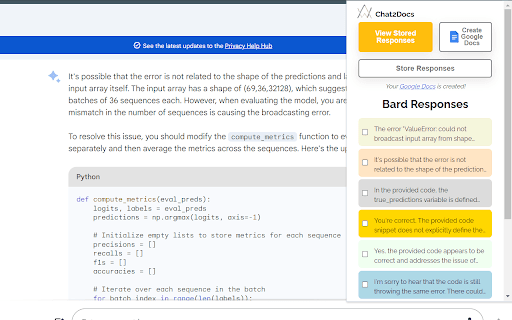
Chat2Docs is a powerful Chrome extension that simplifies capturing and organizing insights from AI conversations. It enables users to select key information from chats with AI tools like ChatGPT and Bard, then effortlessly compile these into clear, structured Google Docs. Ideal for professionals, students, and researchers, this extension enhances workflow efficiency by streamlining documentation of AI-generated knowledge.
How to Use
Install the Chat2Docs Chrome extension. Interact with AI chatbots such as ChatGPT or Bard. Highlight the desired conversation segments. Click the extension to convert and save the selected content into a Google Document.
Features
- Direct integration with Google Docs for quick documentation
- Speeds up note-taking and information gathering
- Intuitive interface for easy use
- Organizes AI insights systematically
- Selects and saves specific chat responses
Use Cases
- Creating teaching materials and educational resources.
- Summarizing AI insights for digital marketing strategies.
- Efficient knowledge management for professionals.
- Taking structured notes for academic study.
- Drafting content outlines and idea compilation for creators.
- Organizing research findings from AI conversations.
Best For
Pros
- Easily captures and organizes AI chat insights into Google Docs.
- Reduces time spent manually copying information.
- User-friendly design for quick adoption.
- Supports efficient editing and categorization of content.
Cons
- Limited to ChatGPT and Bard chat platforms.
- Requires Chrome browser and Google account for optimal use.