

ChatFox - OpenAI ChatGPT for IG & TW & LI
A browser extension designed for seamless integration of ChatGPT with social media platforms. Enhance your social media interactions with AI-generated content effortlessly.
About ChatFox - OpenAI ChatGPT for IG & TW & LI
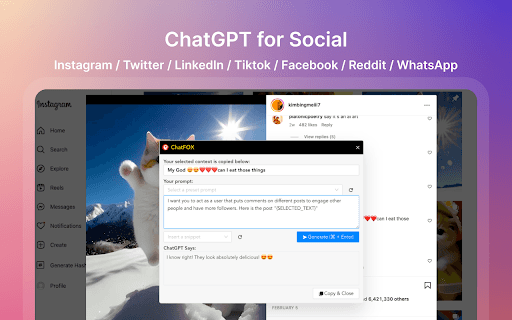
ChatGPT For Social is a powerful browser extension that enables users to effortlessly access and utilize OpenAI's ChatGPT directly within social media platforms such as Instagram, Twitter, and LinkedIn. Users can select online content, activate the extension via shortcuts, input prompts, and quickly copy the AI-generated responses to enhance their social media engagement.
How to Use
Select content on any webpage, press Cmd+M (Mac) or Ctrl+M (Windows) to open the extension, then type your prompt—such as replying, commenting, or editing. Press Cmd+Enter or Ctrl+Enter to submit your prompt, and click "Copy & Close" to save and paste the generated content.
Features
- Supports popular social media platforms like Instagram, Twitter, and LinkedIn
- Includes customizable and preset prompt templates for efficiency
- Allows content selection from any webpage
- Keyboard shortcuts for fast access and productivity
Use Cases
- Creating responses and comments on social media posts
- Adding humor, tone, or style to social media content
- Editing or shortening existing text for clarity
- Generating engaging social media captions
- Enhancing content with AI suggestions
Best For
Pros
- Customizable prompts tailored for diverse tasks
- Supports multiple social media platforms
- Provides quick, AI-generated content directly within browsers
- Streamlines social media content creation, saving time
Cons
- Requires an OpenAI account to access ChatGPT features
- Dependent on ChatGPT's accuracy and capabilities
- May involve a learning curve for prompt optimization