

ChatGPT Batch Tasks
A powerful Chrome extension that enables unlimited bulk ChatGPT tasks at no cost, streamlining large-scale content generation and processing.
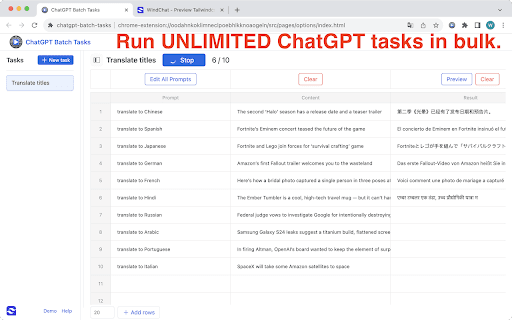
About ChatGPT Batch Tasks
ChatGPT Batch Tasks Excel is a user-friendly Chrome extension that allows users to run unlimited ChatGPT tasks in bulk without any cost. It does not require an OpenAI token, making it accessible to everyone. Users can input prompts, process large volumes of text, and export results in formats like CSV, Excel, JSON, Markdown, or HTML. This extension is ideal for professionals, students, and organizations aiming to automate and expedite content creation, data analysis, and document generation.
How to Use
Install the Chrome extension, input your content or prompts, click "Run" to process, and export the output in your preferred format. It's designed for quick setup and seamless operation.
Features
- Unlimited bulk processing without OpenAI tokens
- Multiple export options including CSV, Excel, JSON, Markdown, and HTML
- Streamlined automation for large-scale ChatGPT tasks
Use Cases
- Automate professional email and communication drafting
- Generate and review legal documents in bulk
- Create advertising content and marketing campaigns efficiently
- Support creative writing projects with batch story or script generation
- Develop technical documentation and user manuals automatically
- Conduct market research with automated report generation
- Interpret complex data sets and produce analytical reports
- Assist HR teams with job ads, training materials, and policies
- Perform bulk language translation and processing tasks
- Manage social media content planning and report generation
- Create blog posts, press releases, and academic papers at scale
- Analyze customer feedback to identify trends and improvement areas
- Generate educational materials, study guides, and practice questions
Best For
Pros
- Supports multiple export formats for versatility
- Free to use without requiring an OpenAI token
- Suitable for diverse professional and academic tasks
- Enables large-scale automation of ChatGPT workflows
Cons
- Dependent on the Chrome extension's functionality and updates
- May need careful prompt design for best results
- Limited by ChatGPT's current capabilities and features