

ChatGPT Chat Exporter
A powerful extension that enables seamless exporting of ChatGPT conversations into text and document formats for easy saving and sharing.
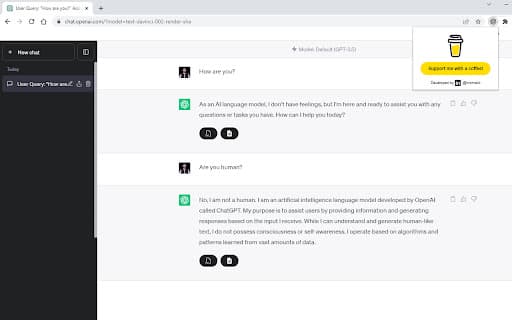
About ChatGPT Chat Exporter
The ChatGPT Exporter extension simplifies the process of saving your ChatGPT chats by allowing quick export to text (TXT) and Word (DOC) files. It helps users archive and organize conversations effortlessly for future reference or documentation needs.
How to Use
Install the ChatGPT Exporter extension in your browser. Open your ChatGPT conversation, then select the desired export format (TXT or DOC) to save the chat directly from the interface.
Features
- Export ChatGPT conversations as text files (TXT)
- Save ChatGPT chats as Word documents (DOC)
- One-click export for quick saving
- Supports multiple file formats for versatility
Use Cases
- Preserving important chat information for future reference
- Creating transcripts for review or sharing
- Archiving ChatGPT interactions for documentation
- Organizing conversations for research or work projects
Best For
StudentsResearchersCustomer support teamsProfessionals documenting chatsWriters and content creators
Pros
- Intuitive interface with seamless integration into ChatGPT
- Supports exporting to both TXT and DOC formats
- Simplifies conversation archiving and management
Cons
- Limited to exporting; lacks editing or advanced features
- Dependent on ChatGPT platform stability and availability
FAQs
What file formats can I export ChatGPT conversations to?
You can export your conversations as text (TXT) files or Word documents (DOC).
Is the extension easy to install and use?
Yes, the extension installs quickly and allows you to export chats with a single click.
Does this extension support multiple export formats?
Yes, it supports exporting conversations as both TXT and DOC files.
Can I export entire chat histories or only specific conversations?
You can export individual conversations directly from the ChatGPT interface.
Are there any costs associated with using this extension?
The extension is free to use, with no hidden charges.