

ChatGPT Chats Filter
A Chrome extension designed to streamline the management and filtering of ChatGPT conversations for improved organization and efficiency.
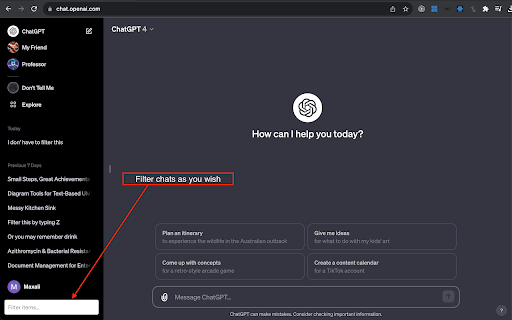
About ChatGPT Chats Filter
ChatGPT Conversations Filter is a versatile and intuitive Chrome extension that enhances your ChatGPT experience by simplifying how you organize and filter your chat sessions. Ideal for frequent users, it helps keep your conversations well-organized and easily accessible, boosting productivity and workflow efficiency.
How to Use
Download and install the Chrome extension. It integrates seamlessly with ChatGPT, allowing you to filter, categorize, and manage your chat sessions effortlessly.
Features
- Quickly organize and filter ChatGPT conversations
- Seamless integration with ChatGPT interface
- User-friendly design for easy management
- Enhances productivity by keeping chats organized
Use Cases
- Managing multiple ChatGPT chat sessions
- Organizing discussions for research or study
- Filtering chats by topic or date
- Improving workflow efficiency
Best For
Frequent ChatGPT usersStudentsResearchersProfessionals using ChatGPT for workContent creators
Pros
- Intuitive and easy-to-use interface
- Simplifies chat organization
- Boosts productivity by filtering chats efficiently
- Seamless integration with ChatGPT
Cons
- Limited to ChatGPT platform
- Requires Chrome browser for optimal use
FAQs
What is the primary function of the ChatGPT Conversations Filter extension?
It helps users organize, filter, and manage their ChatGPT chat sessions efficiently.
How easy is it to install and use this extension?
The extension is straightforward to install and offers a user-friendly interface for quick setup.
Can I filter chats by specific topics or dates?
Yes, the extension allows filtering and organizing conversations based on topics, dates, or other criteria.
Is this extension compatible with all browsers?
It is designed specifically for the Chrome browser for optimal performance.
Does this extension improve my ChatGPT productivity?
Absolutely, by organizing your chats, it helps you find and manage conversations more efficiently.