

ChatGPT-Chrome-Extension
A powerful code review extension utilizing ChatGPT to perform comprehensive spelling and grammar checks within your development environment.
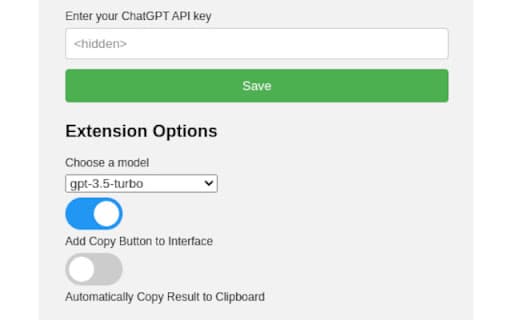
About ChatGPT-Chrome-Extension
This innovative extension harnesses the ChatGPT API to streamline code reviews by automatically detecting and fixing spelling and grammar issues. It assists developers in improving the clarity of code comments, documentation, and code itself, resulting in higher-quality, more maintainable software.
How to Use
Integrate the extension into your IDE or code editor. Select the code or comments you want to review, then activate the extension. It will analyze the selected content via ChatGPT and suggest corrections for spelling and grammar errors.
Features
- Automated detection and correction of spelling and grammar mistakes in code comments and documentation
Use Cases
- Enhancing clarity and accuracy in code comments and documentation
- Maintaining consistent grammar and style across projects
- Correcting spelling errors in variable and function names
Best For
Software developersOpen-source contributorsTechnical writersCode reviewersDevelopment teams
Pros
- Seamless integration with existing development tools
- Supports consistent coding standards
- Boosts code readability and quality
- Speeds up manual code review processes
Cons
- May not be suitable for highly sensitive or confidential code
- Requires an active internet connection for ChatGPT API access
- Privacy concerns related to sharing code with third-party services
- Effectiveness depends on ChatGPT API capabilities
FAQs
How does this extension protect my code's privacy?
The extension sends code snippets to ChatGPT for analysis. Review the API provider's privacy policy and consider avoiding sensitive or confidential code, or anonymizing data before submission.
Which programming languages does the extension support?
It supports various programming languages since it analyzes text input. Effectiveness may vary based on language and coding style, but it generally works across many languages.
Can I customize the correction settings?
Yes, the extension allows customization of correction preferences to suit your coding standards and style guidelines.
Does the extension work offline?
No, it requires an active internet connection to access the ChatGPT API for analysis and suggestions.
Is this extension suitable for large codebases?
Yes, it can handle large codebases, but batch processing or selective review is recommended to optimize performance and API usage.