

ChatGPT Clipper
A powerful extension designed to easily copy, organize, and manage ChatGPT conversations for seamless reference and record-keeping.
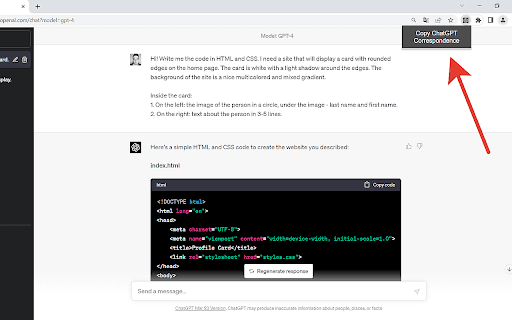
About ChatGPT Clipper
ChatGPT Clipper is a lightweight browser extension that allows users to quickly copy entire chat sessions from ChatGPT. It intelligently distinguishes between user and AI messages, creating clear and organized transcripts. Ideal for professionals, students, and anyone wanting to save or review chat conversations efficiently across work, education, or personal projects.
How to Use
Download and install the ChatGPT Clipper extension from your browser's extension store. Open a ChatGPT conversation, click the extension icon, and copy the full chat transcript. The extension separates messages by origin, making it easy to paste into documents or applications for later use.
Features
- Creates clean, organized chat transcripts
- Automatically separates AI and human messages
- Single-click to copy entire ChatGPT conversations
Use Cases
- Documenting ChatGPT discussions for work, study, or personal reference
Best For
Pros
- Lightweight and non-intrusive on browser performance
- Simple, one-click operation
- Enhances chat organization and record-keeping
- Saves time by automating transcript capture
Cons
- Limited to ChatGPT conversations only
- May need updates to stay compatible with ChatGPT platform changes