

ChatGPT Conversation Tree Graph Visualizer - Dynamic & Interactive History
An advanced ChatGPT extension that visualizes conversation flow through an interactive, dynamic tree graph for better understanding and navigation.
About ChatGPT Conversation Tree Graph Visualizer - Dynamic & Interactive History
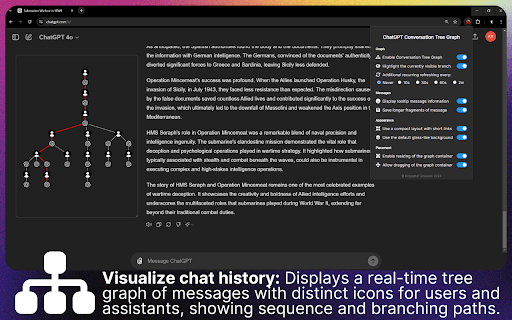
Enhance your ChatGPT experience with this extension that displays a resizable, movable conversation tree graph within your browser. The visual graph illustrates the flow of your chats, including message sequences and branching paths. Hover over nodes to view message content, version info, and sibling counts, making complex conversations easier to follow. You can zoom, pan, and explore the conversation structure in detail, which is especially useful for lengthy or intricate dialogues. The extension automatically detects new messages, updates the tree, and highlights the active branch without draining system resources. This tool is ideal for users who want to analyze, review, or navigate extensive chat histories efficiently.
How to Use
Install the extension to add a conversation graph to the ChatGPT interface. Use the settings menu to customize appearance and update preferences. Interact with ChatGPT normally; the graph updates automatically to reflect new messages. Use toggle buttons to show or hide the graph or trigger manual refreshes.
Features
- Customizable visual appearance and layout
- Real-time updates synchronized with chat activity
- Interactive, zoomable, and draggable conversation tree
- Effortless navigation through conversation branches
Use Cases
- Tracing the full history of lengthy chats
- Quickly locating specific discussion points
- Managing complex conversations with multiple paths
- Analyzing conversation structure for research
- Reviewing chat progress during collaborations
Best For
Pros
- Simplifies navigation in complex conversations
- Provides clear visual flow of dialogue
- Optimized for performance with smart updates
- Flexible container can be moved or resized
Cons
- Initial setup may require some configuration
- Dependent on ChatGPT website layout for operation
- Large conversations might impact performance, though optimized