
ChatGPT: Copy Code Without Scrolling
A browser extension that enables seamless copying of ChatGPT code outputs without the need for scrolling.
About ChatGPT: Copy Code Without Scrolling
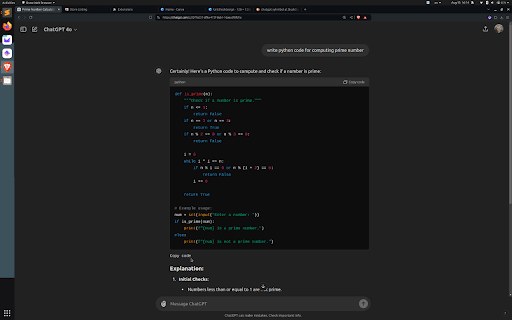
This extension solves the inconvenience of scrolling to copy code from ChatGPT outputs. It provides a quick and easy way to copy code snippets directly, improving efficiency and user experience.
How to Use
Install the extension in your browser. It will automatically add a copy button to ChatGPT code blocks, allowing you to copy code instantly without scrolling.
Features
- Single-click copying of code from ChatGPT outputs
Use Cases
- Copy code snippets quickly for programming projects
- Save time when extracting code from ChatGPT
- Enhance productivity during coding sessions
- Easily transfer code from ChatGPT to your IDE
Best For
Frequent ChatGPT usersCoding studentsSoftware developersProgrammersTechnical writers
Pros
- Enhances user experience on ChatGPT
- Easy to install and use
- Speeds up copying code without scrolling
Cons
- Compatibility depends on ChatGPT updates
- Limited to ChatGPT platform
FAQs
How does this extension improve copying code?
It adds a copy button directly to ChatGPT code blocks, allowing you to copy code instantly without scrolling.
Is this extension free to use?
Yes, the extension is free. Check the extension store for additional features or premium options.
Which browsers support this extension?
It is compatible with popular browsers like Chrome and Firefox. Check the extension page for specific browser support.
Does this extension work on mobile devices?
Currently, it is designed for desktop browsers and may not function on mobile versions of ChatGPT.
Will updates affect the extension’s functionality?
Regular updates ensure compatibility with ChatGPT's latest versions and improve performance.