

ChatGPT Explain
A Chrome extension that simplifies complex concepts within selected text for easier understanding.
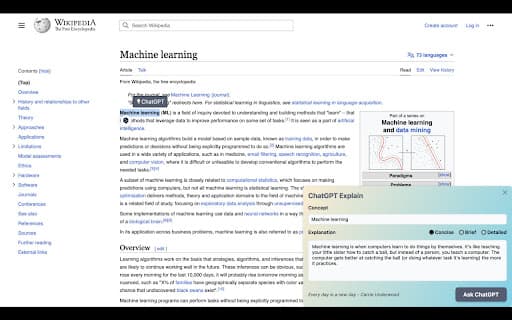
About ChatGPT Explain
ChatGPT Explain is a powerful Chrome extension designed to make complex information more accessible. Users can select any text on their screen to receive clear, concise, or detailed explanations, simplifying understanding of challenging concepts and technical content.
How to Use
Install the ChatGPT Explain Chrome extension, select any text on your webpage, then choose your preferred explanation level—concise, brief, or detailed—to clarify the concepts within the text.
Features
- Provides clear explanations of complex concepts within selected text.
Use Cases
- Understanding industry jargon quickly
- Simplifying technical documentation
- Deciphering complex academic articles
Best For
Lifelong learnersProfessionals seeking quick insightsResearchers analyzing technical contentStudents studying difficult topics
Pros
- Speeds up learning by simplifying difficult topics
- Customizable explanation levels for tailored understanding
- User-friendly and easy to install
- Free to use without additional costs
Cons
- Limited to text-based explanations only
- Requires internet connection for operation
- Quality of explanations depends on ChatGPT's capabilities
FAQs
Is ChatGPT Explain free to use?
Yes, it is completely free with no charges.
How do I install ChatGPT Explain?
Installation is quick and straightforward with just a few clicks.
What types of explanations does ChatGPT Explain provide?
You can choose from brief summaries to detailed analyses based on your needs.
Does it work on all websites?
Yes, it functions on most web pages where text can be selected.
Do I need an internet connection to use it?
Yes, an active internet connection is required for real-time explanations.