

ChatGPT Extension
Quickly access ChatGPT within your current browser tab for seamless, human-like text responses and assistance.
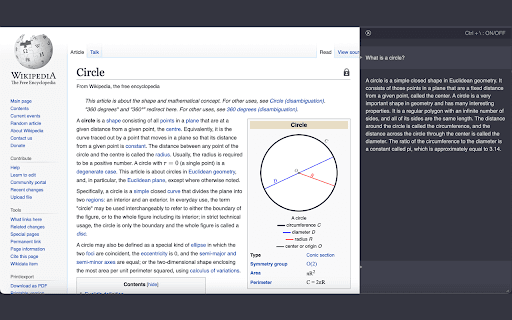
About ChatGPT Extension
This extension integrates ChatGPT directly into your current browser tab, enabling instant access during your work or study sessions. Simply click the icon in your toolbar to activate ChatGPT, a sophisticated language model that delivers human-like responses to your text prompts, boosting productivity and creativity.
How to Use
Click the extension icon in your browser toolbar to activate ChatGPT instantly within the current tab.
Features
- Delivers human-like responses to user input
- Integrates ChatGPT seamlessly into your active browser tab
Use Cases
- Assisting with writing, research, and brainstorming during work sessions
Best For
DevelopersWritersResearchersStudentsAnyone seeking quick AI assistance
Pros
- Provides instant answers and support
- Easy access to ChatGPT directly in your browser tab
- Utilizes advanced AI for natural, human-like conversation
Cons
- May require a ChatGPT account or subscription for full features
- Dependent on an active internet connection
- Response time varies with ChatGPT server availability
FAQs
How can I activate ChatGPT with this extension?
Click the extension icon in your browser toolbar to load ChatGPT in the current tab instantly.
What is ChatGPT used for?
ChatGPT is an advanced language model that generates human-like responses to your text prompts for various tasks.
Is an internet connection required?
Yes, an active internet connection is necessary for ChatGPT to function properly.
Do I need a ChatGPT subscription?
A ChatGPT account or subscription may be required for full access to all features.
Can I use this extension on any browser?
This extension is compatible with most modern browsers that support extensions, such as Chrome and Firefox.