

ChatGPT for Email
AI-driven Gmail assistant that streamlines customer support and accelerates response times.
About ChatGPT for Email
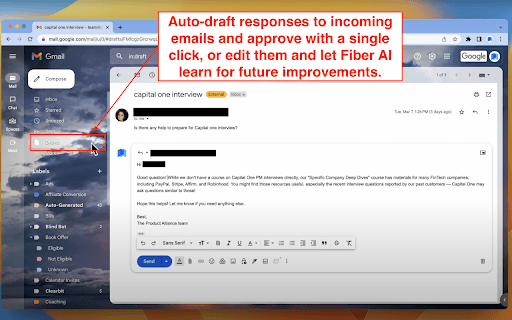
Fiber AI is an intelligent Gmail assistant that automates customer support email responses. It learns from previous interactions to build a personalized knowledge base and generates draft replies, reducing response times by up to 90%.
How to Use
1. Register at https://www.fiber.ai/sign-up. 2. Connect your Gmail account via https://www.fiber.ai/app/gmail. 3. Install the Fiber AI Chrome Extension and link it to your account at https://www.fiber.ai/app/link. 4. Review or approve draft replies directly in Gmail.
Features
- Adaptive AI that improves through user feedback
- Supports multiple languages for global teams
- Seamless integration with Gmail for easy workflow
- One-click approval for draft email responses
Use Cases
- Automating replies to common customer inquiries
- Enhancing productivity of customer support teams
- Significantly reducing email response times
Best For
E-commerce companiesCustomer support teamsSmall and medium-sized businessesOrganizations managing high email volumes
Pros
- Multi-language support for diverse customer bases
- Builds a personalized knowledge base for accurate replies
- User-friendly with quick one-click response approvals
- Dramatically cuts down customer support response time
- Boosts overall support team efficiency
Cons
- Dependent on Gmail for core functionality
- Requires initial setup and AI training
- Performance relies on quality of historical email data
FAQs
How does Fiber AI improve over time?
Fiber AI learns from your past emails and feedback, continuously updating its knowledge to provide better responses.
Which browsers are compatible with Fiber AI?
Fiber AI supports all Chromium-based browsers, including Chrome, Brave, and Edge.
Can Fiber AI integrate with other customer support tools?
Currently, Fiber AI integrates with Gmail and plans to support platforms like Intercom, Zendesk, HubSpot, and Slack in the future.