

ChatGPT for Search - Support GPT-4
A Chrome extension that provides instant access to ChatGPT's AI features directly from your browser for enhanced productivity.
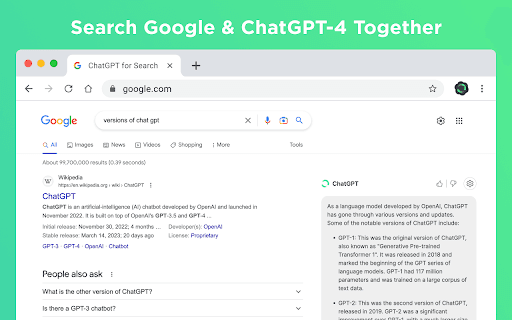
About ChatGPT for Search - Support GPT-4
The ChatGPT Chrome Extension offers quick, seamless access to OpenAI's AI capabilities directly from your browser. Users can ask questions and receive accurate responses in real time, compatible with popular search engines like Google, Bing, and DuckDuckGo. Features include a dark mode, markdown support, code highlighting, and integration with OpenAI's API, including GPT-3.5-Turbo, GPT-4, and ChatGPT Plus for enhanced performance.
How to Use
Sign in at https://chat.openai.com. If you experience errors, refresh the page or reopen chat.openai.com. Persistent issues can be reported in the extension's review section for support.
Features
- Supports multiple search engines for flexibility
- Dark mode for comfortable browsing
- Code syntax highlighting for developers
- Compatible with OpenAI API models including GPT-3.5-Turbo, GPT-4, and ChatGPT Plus
- Markdown rendering for formatted responses
- Instant access to ChatGPT from your browser toolbar
Use Cases
- Use ChatGPT with your preferred search engine
- Customize the extension with dark mode and other settings
- Get instant, real-time answers while browsing
Best For
StudentsResearchersWritersWeb developersContent creatorsKnowledge seekers
Pros
- Supports multiple search engines for versatility
- Compatible with advanced OpenAI models
- Provides quick, easy access to ChatGPT
- Highly customizable interface
Cons
- Requires a ChatGPT account to use
- Potential errors during high traffic periods
- GPT-4 access needs manual enabling
FAQs
How do I set up and use the ChatGPT Chrome Extension?
Sign in at https://chat.openai.com. If you encounter issues, refresh the page or reopen chat.openai.com. For persistent problems, report them in the extension's review section.
What should I do if the extension shows errors?
Try reloading chat.openai.com. High demand can cause errors. If problems continue, report them through the extension's review support.
Does the extension support GPT-4?
Yes, it supports GPT-4, but you may need to enable it manually in your OpenAI account settings.
Is a ChatGPT account required to use this extension?
Yes, you need a ChatGPT account to access the AI features through the extension.
Can I customize the extension's appearance?
Yes, features like dark mode and layout options allow you to personalize your browsing experience.
Which search engines does the extension support?
It works with popular search engines such as Google, Bing, and DuckDuckGo for versatile browsing.
Is the extension suitable for developers?
Absolutely, with features like code highlighting and support for GPT models, it's ideal for developers and coders.
Are there any costs associated with the extension?
The extension itself is free to use, but access to certain OpenAI models may require a subscription or API key.