

ChatGPT for Yahoo Mail
A Chrome extension designed to enhance your Yahoo Mail experience by enabling seamless email composition and analysis with ChatGPT.
About ChatGPT for Yahoo Mail
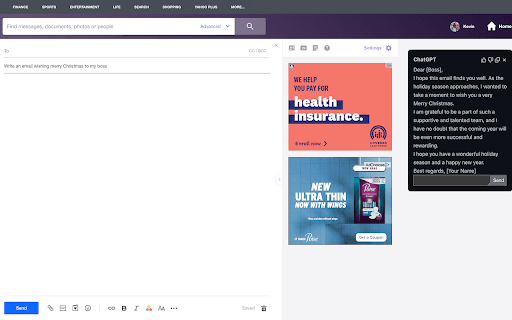
This Chrome extension empowers users to compose, analyze, and understand emails within Yahoo Mail using ChatGPT. Generate email drafts from topics, analyze email content for key insights, and ask follow-up questions by searching email threads efficiently.
How to Use
Open Yahoo Mail and ChatGPT, then type your email command in the subject line to generate drafts. For analysis, open an email and click the 'ChatGPTfy' button. Ask follow-up questions in the ChatGPT pop-up window for detailed insights.
Features
- Generate email insights with sentiment analysis and key phrase extraction
- Create email drafts from a specified subject or topic
- Customize ChatGPT queries for in-depth email analysis
- Search and answer follow-up questions within email threads
Use Cases
- Locating tracking numbers within email conversations
- Drafting holiday greeting emails quickly
- Extracting key information from emails to craft responses
Best For
Yahoo Mail usersIndividuals needing help with email writingProfessionals automating email workflowsUsers seeking quick email summaries and insights
Pros
- Customizable queries for detailed message analysis
- Utilizes ChatGPT for intelligent email drafting and analysis
- Provides quick insights and follow-up answer capabilities
- Free and open-source extension
- Client-side operation enhances data security
Cons
- Requires a ChatGPT account and login
- Dependent on ChatGPT service availability and performance
- May need to log out and back into ChatGPT to troubleshoot
- Follow-up questions depend on current ChatGPT context
FAQs
How can I compose an email using this extension?
Open Yahoo Mail and ChatGPT, click 'Compose', type your command in the subject line (e.g., 'Send a holiday greeting to my boss'), then press enter. A ChatGPT window will appear with the generated email.
How do I analyze an email I received?
Open the email in Yahoo Mail, click the 'ChatGPTfy' button on the toolbar, and a ChatGPT window will display key insights and extracted information from the email.
How do I customize the default query for analysis?
Click the extension icon in Chrome, select 'ChatGPT for Yahoo Mail', enter your preferred query, and click 'Update' to save changes.
What happens to my chat history after use?
The extension deletes the conversation once you close the ChatGPT window, ensuring your chat data remains private. You can also view recent conversations directly on https://chat.openai.com/.
What should I do if ChatGPT isn't responding?
Visit https://chat.openai.com/ and log out then log back in to resolve connectivity issues.