

ChatGPT Helper - GPTab
Enhances your ChatGPT experience with GPT-3.5 Turbo, customizable interface colors, and chat clutter reduction features.
About ChatGPT Helper - GPTab
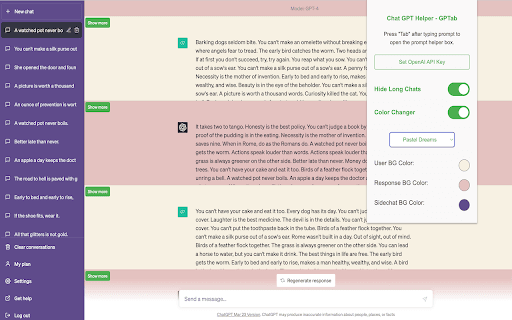
The ChatGPT Helper - GPTab Chrome Extension elevates your ChatGPT interactions by integrating GPT-3.5 Turbo for smarter responses. Customize the chat appearance with vibrant colors and streamline your view by collapsing lengthy conversations.
How to Use
Install the extension, navigate to chat.openai.com, and press the 'Tab' key during chat to receive suggestions powered by GPT-3.5 Turbo. Enter your OpenAI API key in the extension settings to enable full features.
Features
- Customizable interface colors for a personalized look
- Collapse long chat conversations for easier reading
- Built-in GPT-3.5 Turbo assistant for smarter responses
Use Cases
- Personalize ChatGPT with custom color themes
- Simplify chat view by hiding lengthy messages
- Receive real-time AI suggestions during conversations
Best For
WritersResearchersChatGPT enthusiastsStudentsProfessionals seeking productivity tools
Pros
- Seamless integration with chat.openai.com
- Enhances ChatGPT with GPT-3.5 Turbo support
- Allows interface customization for a better user experience
- Improves readability by collapsing long chats
Cons
- Requires initial setup for API key and color preferences
- Needs an OpenAI API key for GPT-3.5 Turbo features
- Limited to use on chat.openai.com platform
FAQs
How can I activate the GPT-3.5 Turbo assistant?
Install the extension, visit chat.openai.com, and press the 'Tab' key while typing. Make sure your OpenAI API key is entered in the extension settings.
How do I change the chat interface colors?
Access the extension settings to customize colors of specific chat elements for a personalized appearance.
How can I hide long chat messages?
Enable the hide long chats option in the extension settings. Long messages will be collapsed with a toggle for viewing more or less.
Is this extension compatible with other browsers?
Currently, the extension is designed for Chrome. Compatibility with other browsers may vary.
Do I need an API key to use the extension?
Yes, entering your OpenAI API key is required to activate GPT-3.5 Turbo features within the extension.