

ChatGPT Helper. Quick Access & Download
A Chrome extension that offers fast access to ChatGPT and enables easy chat downloads.
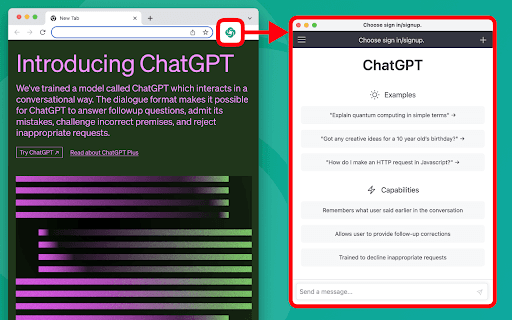
About ChatGPT Helper. Quick Access & Download
ChatGPT Helper is a versatile Chrome extension designed to boost your productivity with seamless ChatGPT access. It allows you to quickly open the AI assistant and effortlessly download your conversations for future review or analysis.
How to Use
Click the extension icon to open ChatGPT instantly. To save a conversation, right-click on the chat and select 'Download chat' from the context menu.
Features
- One-click chat download for easy saving
- Instant access to ChatGPT from your browser
Use Cases
- Save and organize ChatGPT conversations for later reference.
- Access ChatGPT quickly without navigating to the website.
Best For
ProfessionalsStudentsResearchersContent creatorsWriters
Pros
- Effortless chat downloading feature
- User-friendly interface
- Fast and convenient ChatGPT access
Cons
- Limited features beyond chat download and quick access
- Requires Google Chrome browser
FAQs
How can I download my ChatGPT conversations?
Right-click on the chat and select 'Download chat' from the context menu.
How do I open ChatGPT with this extension?
Click the extension icon in your browser toolbar for instant access.
Is this extension compatible with other browsers?
No, it is designed exclusively for Google Chrome.
Can I download multiple chats at once?
The extension supports downloading individual chats; bulk download is not available.
Is my chat data stored or shared?
No, all chats are stored locally on your device and are not shared externally.