

ChatGPT - Lets talk
A Chrome extension that enhances ChatGPT with voice control and text-to-speech capabilities for a more accessible and hands-free experience.
About ChatGPT - Lets talk
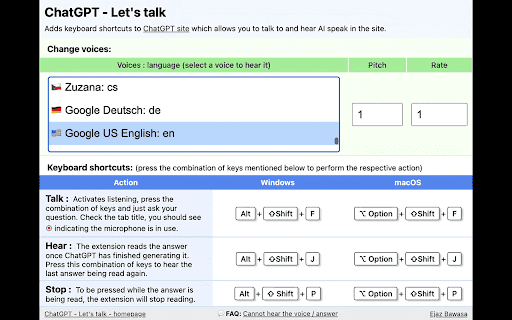
ChatGPT - Lets Talk is a powerful Chrome extension that introduces voice interaction features to ChatGPT. Users can ask questions using voice commands and listen to AI responses read aloud. The extension now allows customization of the AI's voice, pitch, and speech rate for a personalized experience.
How to Use
Press Alt+Shift+F (Windows) or Option+Shift+F (Mac) to activate voice input. Use Alt+Shift+J or Option+Shift+J to have ChatGPT repeat the last response. Stop speech output by pressing Alt+Shift+P or Option+Shift+P on your keyboard.
Features
- Customize voice pitch, speed, and selection from over 100 voices
- Voice input for hands-free interaction with ChatGPT
- Keyboard shortcuts for quick control
- Seamless integration with Chrome browser
- Text-to-speech for AI responses
Use Cases
- Listening to ChatGPT while multitasking
- Hands-free chatting for convenience
- Enhanced accessibility for visually impaired users
- Practicing language and pronunciation skills
Best For
DevelopersStudentsWritersResearchersFrequent ChatGPT users
Pros
- Utilizes native browser features for reliability
- Improves accessibility and user engagement
- Easy-to-use keyboard shortcuts
- Lightweight, no external dependencies
- Extensive voice customization options
Cons
- May face compatibility issues with future ChatGPT updates
- Dependent on the browser's text-to-speech quality
- Requires learning and memorizing keyboard shortcuts
FAQs
How can I activate voice input in ChatGPT?
Press Alt+Shift+F (Windows) or Option+Shift+F (Mac) to enable voice commands.
How do I have ChatGPT repeat the last response?
Press Alt+Shift+J or Option+Shift+J to replay the previous answer.
How do I stop speech output while ChatGPT is speaking?
Press Alt+Shift+P or Option+Shift+P to halt the voice reading.
Can I customize the voice used by the extension?
Yes, you can select from over 100 voices and adjust pitch and speed settings.
Is this extension compatible with all browsers?
It is designed for Chrome but may work with other Chromium-based browsers.
Does this extension improve accessibility for visually impaired users?
Yes, it offers voice interaction and speech output to assist users with visual impairments.