

ChatGPT Lightspeed Keyboard
Enhance your ChatGPT experience with this Chrome extension featuring powerful keyboard shortcuts for seamless interaction.
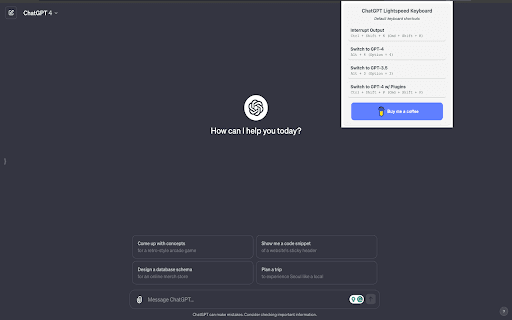
About ChatGPT Lightspeed Keyboard
ChatGPT Lightspeed Keyboard is a Chrome extension designed to optimize your AI interactions. It offers intuitive keyboard shortcuts to quickly interrupt responses, switch between GPT models like GPT-4, GPT-3.5, and GPT-4 with Plugins, making your workflow faster and more efficient.
How to Use
Install the Chrome extension and utilize designated keyboard shortcuts such as Ctrl+Shift+K, Cmd+Shift+K, Alt+4, Alt+3, and Ctrl+Shift+P to control and enhance your ChatGPT sessions.
Features
- Custom keyboard shortcuts for ChatGPT control
Use Cases
- Interrupt ongoing ChatGPT responses instantly
- Switch effortlessly between GPT-4, GPT-3.5, and GPT-4 with Plugins
Best For
Students seeking quick AI accessFrequent ChatGPT usersResearchers utilizing AI toolsWriters enhancing productivityDevelopers integrating AI workflows
Pros
- Compatible with Windows and Mac systems
- Boosts efficiency during AI interactions
- User-friendly and straightforward
- Provides rapid access to essential ChatGPT functions
Cons
- Requires memorizing specific keyboard shortcuts
- Dependent on installing a Chrome extension
- Limited features beyond shortcut commands
FAQs
What keyboard shortcuts does this extension offer?
It includes shortcuts for interrupting responses (Ctrl+Shift+K or Cmd+Shift+K), switching to GPT-4 (Alt+4), GPT-3.5 (Alt+3), and GPT-4 with Plugins (Ctrl+Shift+P).
Is this extension compatible with Mac and Windows?
Yes, the extension works seamlessly on both Windows and Mac operating systems.
How can I install this Chrome extension?
Download and install it from the Chrome Web Store, then configure your preferred keyboard shortcuts.
Does this extension improve my ChatGPT productivity?
Absolutely, it streamlines your workflow by providing quick access to key functions with keyboard shortcuts.
Are there any limitations to the extension?
Its functionality is primarily focused on shortcut controls, with limited options beyond predefined commands.