

ChatGpt Popup
A Chrome extension that provides quick and easy access to ChatGPT directly from your browser.
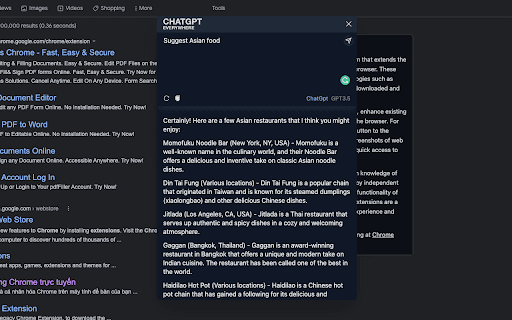
About ChatGpt Popup
ChatGPT Popup is a user-friendly Chrome extension that enables seamless interaction with ChatGPT directly within your browser. It simplifies access to ChatGPT's AI capabilities, eliminating the need to visit separate websites or applications for assistance.
How to Use
Download and install the ChatGPT Popup extension from the Chrome Web Store. Click the extension icon in your browser toolbar to open a chat window and start interacting with ChatGPT instantly.
Features
- Simple installation process
- Direct, instant access to ChatGPT
- Convenient in-browser chat interface
Use Cases
- Conduct research, brainstorm ideas, or write creatively without leaving your webpage.
- Generate content, translate languages, and get detailed answers using ChatGPT.
- Ask questions and receive quick responses while browsing the internet.
Best For
ResearchersFrequent ChatGPT usersStudentsDevelopersWriters
Pros
- Easy to install and navigate
- Provides quick, direct access to ChatGPT
- Enhances productivity by saving time
Cons
- Dependent on ChatGPT's availability and performance
- May require a ChatGPT account or API key
- Potential privacy concerns if user data is collected or transmitted
FAQs
What is ChatGPT Popup?
ChatGPT Popup is a Chrome extension that enables users to chat with ChatGPT directly within their browser for quick assistance.
How do I start using ChatGPT Popup?
Install the extension from the Chrome Web Store and click its icon in your browser toolbar to open a chat window.
Is ChatGPT Popup free to use?
Yes, the basic extension is free, but advanced features may require a ChatGPT subscription or API key.
Can I use ChatGPT Popup on any website?
Yes, you can access ChatGPT from any webpage by clicking the extension icon and opening the chat window.
Does using the extension compromise my privacy?
Privacy depends on the extension's data collection policies; review the privacy policy before use.