

ChatGPT Pro - Advanced Features
A powerful ChatGPT enhancement tool featuring speech-to-text, saved prompts, and content selection capabilities to streamline your workflow.
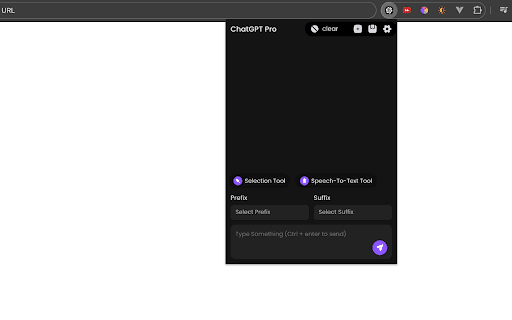
About ChatGPT Pro - Advanced Features
Enhance your ChatGPT experience with advanced features including speech-to-text input, customizable saved prompts, and quick content extraction. This tool reduces the need for manual typing and tab switching by allowing easy prompt management and website content copying, making your workflow more efficient and accessible.
How to Use
Use the speech-to-text feature to verbally input prompts. Save your frequently used prompts for quick access. Attach saved prompts as prefixes or suffixes to your main prompts to maintain consistency. Use the content selection tool to copy website text efficiently. Share the tool with colleagues to boost collaborative productivity.
Features
- Content selection tool for copying from websites
- Seamless integration with ChatGPT
- Prefix and suffix prompt customization for consistent queries
- Saved prompts for rapid retrieval of common questions
- Speech-to-text for hands-free prompt input
Use Cases
- Automating repetitive chat prompts
- Providing quick reference during interviews and exams
- Extracting text from copy-protected websites
- Streamlining research and content creation tasks
Best For
Pros
- Speeds up workflows with quick access to saved prompts
- Simplifies copying content from protected websites
- Improves accessibility through speech-to-text input
- Reduces time spent on repetitive typing and tab switching
- Supports complex prompts with prefix and suffix options
Cons
- Speech-to-text accuracy depends on audio quality
- Website content selection may not be perfect on all sites
- Relies on ChatGPT's availability and performance
- Effectiveness varies with the quality of saved prompts