
Chatgpt Prompt plus
Enhance your ChatGPT experience with this Chrome extension that allows you to save, manage, and reuse prompts using customizable templates for increased productivity.
About Chatgpt Prompt plus
ChatGPT Prompt Plus is a versatile Chrome extension that streamlines your ChatGPT workflow by enabling easy saving, organizing, and reusing prompts. It features a customizable prompt library with flexible templates, including parameters with default values and input types. This tool helps users craft high-quality, adaptable prompts suited for various tasks and scenarios.
How to Use
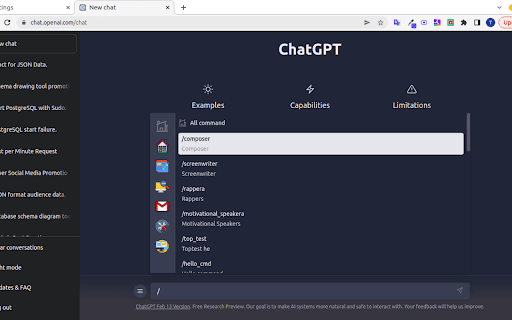
Access the prompt settings via the hamburger menu in ChatGPT. Add and customize your prompts in the settings. Type a slash (/) in the chat input to open the prompts list. Select a prompt, fill in any necessary parameters, and click the send icon to execute.
Features
- Supports multiple parameter types
- Quick search popup for prompts
- Intuitive and user-friendly interface
- Organize and manage prompt collections
- Categorize prompts with icons and tags
- Link parameters with prompts
- Assign hotkeys for quick access
- Pre-designed prompt templates
Use Cases
- Create versatile prompts with adjustable parameters for various tasks
- Rapidly access and deploy frequently used commands and responses in ChatGPT
Best For
Pros
- User-friendly interface for easy navigation
- Efficient prompt organization and management
- Customizable templates with adjustable parameters
- Saves time through prompt reuse
Cons
- Some users experience issues when sending prompts with parameters
- Limited functionalities outside ChatGPT environment
- Potential compatibility conflicts with other extensions