

ChatGPT Prompts Manager
A Chrome extension designed to simplify managing and utilizing custom AI prompts for enhanced productivity.
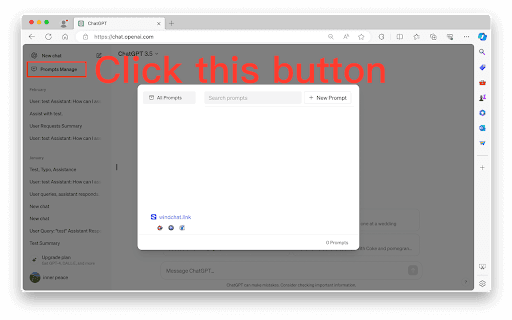
About ChatGPT Prompts Manager
ChatGPT Prompts Manager is a powerful Chrome extension that helps users organize and access AI prompts efficiently. It enables creating a personalized prompt library, streamlining AI interactions, and improving response quality. Stored locally for maximum privacy, this extension boosts productivity while safeguarding user data.
How to Use
Install the ChatGPT Prompts Manager Chrome extension. Save your frequently used prompts in the library. Quickly find prompts using the local search feature. Use the selected prompt to interact smoothly with ChatGPT or other AI models.
Features
- Streamlined AI prompt management
- Fast local search for prompts
- Personalized prompt library
- Data privacy through local storage
Use Cases
- Enhance consistency and quality of AI responses
- Quickly access pre-defined prompts for various tasks
- Optimize workflows by reducing repetitive prompt entry
Best For
AI enthusiastsSoftware developersResearchersContent creatorsMarketing professionalsWriters
Pros
- Quick access to frequently used prompts
- Improves AI response quality with custom prompts
- Efficient local search for prompt retrieval
- Boosts productivity in AI interactions
- Stores prompts securely on your device
Cons
- Requires Chrome browser for full functionality
- Initial setup involves creating and organizing prompts
- Necessitates Chrome extension installation
FAQs
What is the ChatGPT Prompts Manager?
It is a Chrome extension that helps users organize and manage AI prompts for faster, more efficient interactions with ChatGPT and similar AI models.
Where are my prompts stored?
All prompts are stored securely on your local device, ensuring complete privacy and data security.
How does this extension improve AI interactions?
It provides quick access to customized prompts, making interactions more efficient and enhancing response quality.
Is this extension compatible with all browsers?
No, it is specifically designed for Google Chrome and requires installation of the Chrome extension.
Can I customize my prompts easily?
Yes, you can create, edit, and organize prompts effortlessly within the extension's user-friendly interface.