

ChatGPT Share 2.0 - Markdown & Image
Enhance your ChatGPT experience with this extension that enables seamless saving and sharing of conversations as Markdown and PNG files.
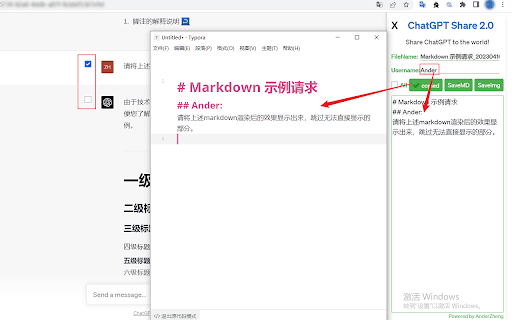
About ChatGPT Share 2.0 - Markdown & Image
ChatGPT Share is an intuitive extension designed to help users effortlessly save, organize, and share their ChatGPT conversations. It allows converting chats into Markdown documents and PNG images, making it simple to archive, revisit, and distribute valuable AI-generated content efficiently.
How to Use
Install the ChatGPT Share extension. Open a ChatGPT conversation on supported platforms like chat.openai.com or others. Use the extension to save the chat as Markdown or PNG, customize filenames and usernames if needed, then click to save or copy the content for sharing.
Features
- Set a custom username when exporting as Markdown for privacy.
- Select specific conversation segments for conversion.
- Save ChatGPT conversations as PNG images with a single click.
- Export conversations as Markdown files with easy copy and download options.
- Customize filenames for both Markdown and PNG exports.
Use Cases
- Sharing ChatGPT interactions in a clear, readable format
- Archiving important AI-generated discussions
- Creating documentation or reports from ChatGPT outputs
- Saving key conversations for future reference
Best For
StudentsWritersContent creatorsChatGPT enthusiastsResearchersProfessionals using ChatGPT for work
Pros
- Compatible with multiple websites and platforms
- Offers customization for privacy and organization
- Simplifies saving and sharing ChatGPT conversations
- Supports multiple formats, including Markdown and PNG
- Allows selecting specific conversation parts for export
Cons
- PNG generation may take time for lengthy chats
- Requires reopening extension when switching conversations
- May need page refresh if extension icon is unresponsive
- Saves only the active conversation; reopen for new chats
FAQs
What should I do if the extension icon doesn't respond?
Try refreshing the webpage and then click the icon again.
Why does generating PNG images take a while?
Long conversations require more processing time. To speed up, select only the necessary parts of the chat.
Can I save conversations after opening the extension?
No, it only captures the current active conversation. Reopen the extension to save new chats.
How do I handle switching between different conversations?
Reopen the extension after switching to a different chat to ensure the new content is captured.
Is it possible to customize filenames for exports?
Yes, you can set custom filenames for both Markdown and PNG files during the save process.