

ChatGPT Spotlight
A Spotlight-style search tool for quickly finding ChatGPT conversations and GPTs.
About ChatGPT Spotlight
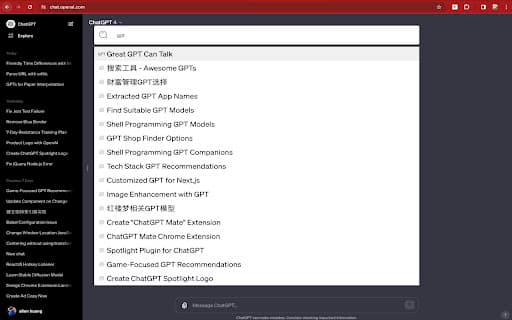
Enhance your ChatGPT experience with this MacOS Spotlight-like search extension. Quickly locate conversations and GPTs, navigate results using keyboard arrows, and access chats directly without a mouse, streamlining your workflow.
How to Use
Press Cmd+S within ChatGPT to open the search interface. Enter keywords to find specific conversations or GPTs, use arrow keys to browse results, and hit Enter to open a chat directly.
Features
- Seamless keyboard navigation with arrow keys and Enter
- Customizable hotkey for quick access
- Simple management of search indexes
- Instantly search through ChatGPT conversations and GPTs
- Designed with privacy in mind, no server involvement
Use Cases
- Quickly locate specific information in past ChatGPT conversations
- Find relevant chats based on keywords or topics
- Switch efficiently between different GPT models
- Organize and access multiple ChatGPT sessions
- Save time during research or content creation
Best For
DevelopersPower users of ChatGPTResearchers and studentsContent creatorsWriters
Pros
- Highly customizable hotkey setup
- Intuitive keyboard-based navigation
- Simple to use and install
- Fast search results for improved productivity
- Maintains user privacy with local processing
Cons
- Limited to ChatGPT conversations and GPTs
- Requires installation as a browser extension
FAQs
How do I activate the search feature?
Simply press Cmd+S within ChatGPT to open the search box.
Is my data kept private?
Yes, all searches are local; no server calls or tracking are involved.
Can I change the hotkey?
Absolutely, the hotkey is customizable to suit your preferences.
Does this work on all browsers?
It works as a browser extension compatible with major browsers supporting extensions.
Is it compatible with all ChatGPT versions?
It is designed to work seamlessly with the latest ChatGPT interfaces.