

ChatGPT to PNG
A Chrome extension that allows you to effortlessly save your ChatGPT conversations as a single, high-quality PNG image.
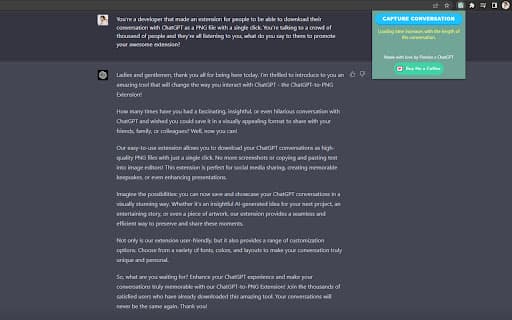
About ChatGPT to PNG
The ChatGPT Chat Capture Chrome Extension enables quick and easy saving of your chat conversations as a single vertical PNG image. Perfect for archiving important discussions or sharing memorable chats, this tool captures entire conversations with a single click, delivering high-quality images for easy storage and sharing.
How to Use
Install the ChatGPT Chat Capture Chrome Extension. Open a ChatGPT conversation you want to save. Click the 'Capture Conversation' button. The extension processes and generates a single vertical PNG image of the entire chat. Save or share the image directly from your device.
Features
- Capture full ChatGPT conversations in one image
- Simple one-click operation
- Exports conversations as high-resolution PNG images
Use Cases
- Share key discussions with colleagues
- Archive important ChatGPT interactions
- Save memorable chats for future reference
- Document research or learning sessions
Best For
ChatGPT users needing conversation archivesProfessionalsStudentsResearchersContent creators
Pros
- Ideal for archiving and sharing chat histories
- Produces high-quality PNG images
- Captures entire conversations in a single image
- User-friendly with one-click functionality
Cons
- Requires Chrome browser
- Large images for lengthy chats
- Limited to ChatGPT conversations only
FAQs
What is the purpose of the ChatGPT Chat Capture Chrome Extension?
It enables you to save full ChatGPT conversations as a single vertical PNG image with a single click.
How can I use this extension to save a chat?
Install the extension, open your ChatGPT conversation, click the 'Capture Conversation' button, and then save or share the generated image.
Can I share the saved images with others?
Yes, you can easily share the PNG images via email, messaging apps, or social media platforms.
Does this extension work with all Chrome versions?
It is compatible with the latest versions of Chrome, ensuring smooth operation and updates.
Is the extension suitable for professional use?
Absolutely, it’s ideal for professionals, researchers, students, and content creators who need to archive or share chat conversations easily.