

ChatGPT Toolbar Companion
Enhance your ChatGPT experience with this powerful browser extension featuring custom prompts, text-to-speech, speech-to-text, and extensive customization options.
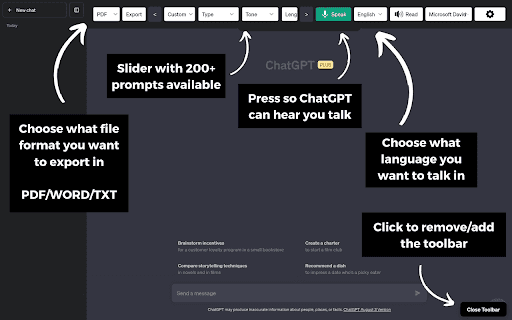
About ChatGPT Toolbar Companion
The ChatGPT Toolbar Companion is a versatile browser extension that elevates your ChatGPT interactions. It offers an extensive set of features including customizable prompts, real-time text-to-speech and speech-to-text capabilities, auto-continuation, and personalized toolbar options, making your workflow more efficient and engaging.
How to Use
Download and install the ChatGPT Toolbar Companion on a compatible desktop browser. Launch ChatGPT and activate the extension. Refresh the page if the toolbar does not appear initially.
Features
- Extensive customization options
- Auto-continue conversations
- Create and save custom prompts
- Toolbar personalization
- Over 200 predefined prompts
- Advanced speech-to-text conversion
- Instant access to features
- Two-way voice and text communication
- Natural-sounding AI voices
- Chat export capabilities
- Realistic AI voice options
Use Cases
- Multitasking during chat sessions
- Enhancing conversations and boosting creativity
- Using voice commands to interact with ChatGPT
- Streamlining online research and productivity
- Engaging in immersive learning experiences
Best For
Content creatorsStudents and learnersWriters and authorsProgrammers and developersResearchers and academicsProfessionals seeking efficient communication
Pros
- Boosts productivity and multitasking efficiency
- Provides a wide array of prompts for dynamic interactions
- Highly customizable to fit individual workflows
- Enhances ChatGPT with voice and text tools
- Accessible voice features for better interaction
Cons
- Compatibility limited to desktop browsers
- Realistic voice options are browser-dependent
- Toolbar may require page refresh to display
FAQs
Which browsers support the ChatGPT Toolbar Companion?
It is compatible with supported desktop browsers such as Chrome, Firefox, and Edge.
What if the toolbar does not appear after installation?
Try refreshing your browser page to activate the toolbar.
Are realistic AI voices available on all browsers?
Realistic AI voices are browser-dependent and may not work on all browsers, but basic voices are available universally.
Can I customize prompts within the extension?
Yes, you can create, save, and access custom prompts for personalized interactions.
Is the extension suitable for mobile devices?
Currently, the extension is designed for desktop browsers and may not support mobile platforms.