

ChatGPT Vision for ALL
A powerful Chrome extension that enables content analysis and text optimization through seamless ChatGPT integration, enhancing your browsing experience.
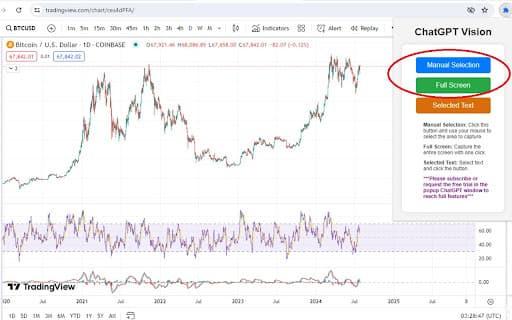
About ChatGPT Vision for ALL
This comprehensive Chrome extension boosts your productivity by integrating ChatGPT for advanced content analysis and text enhancement. It captures webpage screenshots or selected text, automatically inserts AI-generated suggestions, and offers efficient tools for accurate content editing and rewriting.
How to Use
Install from the Chrome Web Store. Capture a specific area, full page, or selected text. Input prompts and let the extension automatically insert AI-generated content into the webpage’s text fields for quick editing.
Features
- Save and revisit chat conversations
- Capture screenshots or selected text easily
- Seamless ChatGPT integration for content enhancement
- Retry and refine outputs for accuracy
- Automatic insertion of AI-generated text
- Manage prompts efficiently
Use Cases
- Translate selected text effortlessly
- Draft professional email responses quickly
- Analyze stock and trading charts for better decisions
- Rewrite and optimize content with minimal effort
- Get intelligent suggestions to enhance and refine text
- Receive instant grammar checks and feedback
Best For
Cryptocurrency tradersData analysts and content creatorsTranslators and language professionalsWriters and bloggersStudents and researchersStock market investorsEditors and content editorsEmail marketers
Pros
- Intuitive and easy-to-use interface
- Versatile features for diverse tasks
- Saves time with automation
- Fully integrates with ChatGPT for advanced AI support
- Enhances productivity across workflows
Cons
- Full feature access requires a subscription
- Dependent on ChatGPT's availability and accuracy
FAQs
What are the main features of this Chrome extension?
It offers screen and text capture, automated AI content insertion, conversation saving, prompt management, ChatGPT integration, and a user-friendly interface for efficient content editing.
Is there a free trial available?
Yes, a 7-day free trial provides full access to all features. Basic ChatGPT functions are available without a subscription.
What are common use cases for this extension?
Use it for trading analysis, rewriting content, drafting emails, translating text, and getting instant grammar and style feedback.
Can I customize prompts within the extension?
Yes, you can manage and customize prompts to suit your specific content needs.
Does the extension work on all websites?
Yes, it is compatible with most websites, allowing easy content capture and editing across platforms.