

ChatGPT Voice Plus Game and Translation
A versatile Chrome extension that enables voice interaction, gaming, and translation features with ChatGPT for a richer AI experience.
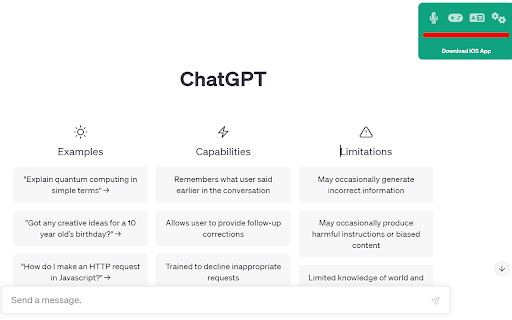
About ChatGPT Voice Plus Game and Translation
ChatGPT Voice Plus Game and Translation is a powerful Chrome extension designed to elevate your ChatGPT experience. It allows seamless voice commands for natural conversations, offers spoken responses, and includes gaming and translation capabilities. Whether you're translating text or playing games with AI, this extension makes interactions more engaging and accessible.
How to Use
Install the extension from the Chrome Web Store, refresh the ChatGPT page, and click 'Start' to activate. Grant microphone access and customize settings for language, voice, and speech rate to tailor your experience.
Features
- Voice-controlled interactions with ChatGPT
- Real-time speech-to-text and text-to-speech features
- Built-in translation for multiple languages
- Interactive game modes with ChatGPT
Use Cases
- Hands-free chatting with ChatGPT
- Playing interactive AI games
- Instant translation of text within ChatGPT
Best For
Language learners seeking practiceChatGPT users wanting voice interactionUsers interested in AI-based gamingIndividuals needing translation tools
Pros
- Simple installation and user-friendly interface
- Customizable options for voices and languages
- Enhances conversations with voice and speech features
- Includes gaming and translation functionalities
Cons
- Requires microphone access permissions
- Potential compatibility issues with ChatGPT updates
- Dependent on ChatGPT's page structure for functionality
FAQs
How do I set up ChatGPT Voice Plus Game and Translation?
Download from the Chrome Web Store, install, reload ChatGPT, click 'Start', and allow microphone access.
Will the extension work if OpenAI updates ChatGPT's layout?
The extension relies on ChatGPT's current HTML structure. Changes by OpenAI may temporarily disrupt its functionality.
Can I customize the voice and language settings?
Yes, you can adjust voice type, language, and speech rate through the extension's settings menu.
Does this extension support multiple languages?
Yes, it offers translation and voice options for various languages to suit your needs.
Is this extension suitable for language learners?
Absolutely. It provides pronunciation, translation, and speech features that aid language practice.